Table of Contents #
🎯 Introduction #
Shortcodes are the backbone of WordPress flexibility. With Simple Form by wpazleen, you can embed forms anywhere on your website using shortcodes — including floating forms and themed layouts.
In this guide, we’ll explore shortcode advanced usage in Simple Form, explaining how to use shortcode parameters like position and theme to enhance your form display.
⚙️ Step 1: Find Your Form Shortcode #
- Open your WordPress Dashboard → Simple Form → All Forms.
- You’ll see a list of all created forms along with their shortcodes.
Example: - Copy the shortcode of the form you want to embed.
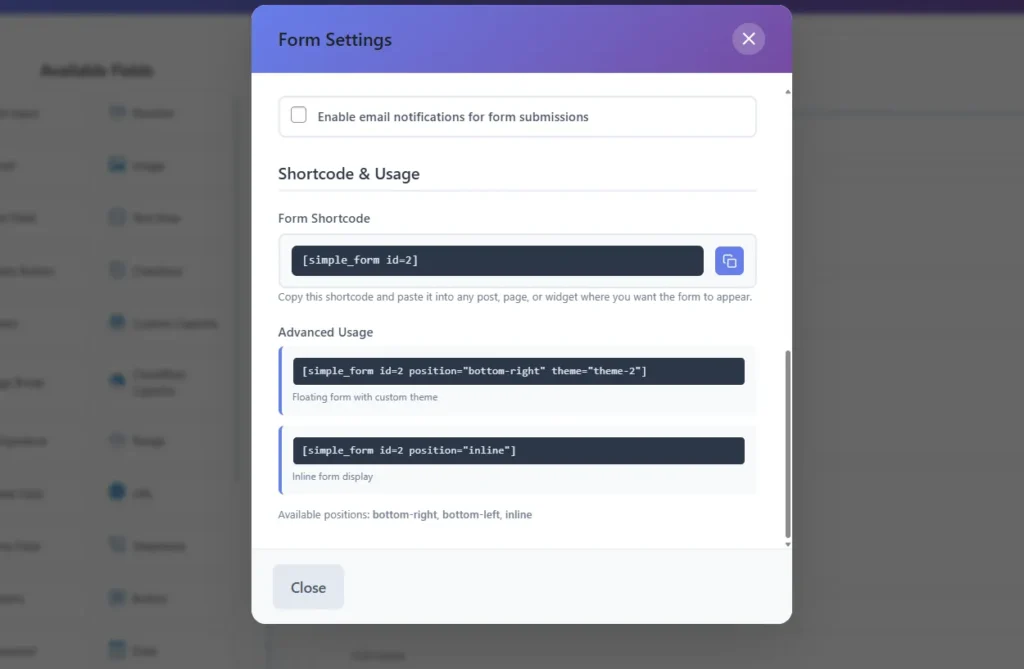
You can also find the same shortcode inside the Form Editor at the top section.
🧩 Step 2: Insert Shortcode into a Page or Post #
You can add the shortcode into:
- Gutenberg Block Editor – use a Shortcode block.
- Classic Editor – paste directly into the editor.
- Elementor or Other Builders – use an HTML or shortcode widget.
Example:
[simple_form id="2"]
This will display your form inline wherever you place it.
🪄 Step 3: Use Shortcode Parameters (Position & Theme) #
The Simple Form shortcode supports advanced parameters for customization.
🔹 Add Form Position: #
You can display the form in different positions on your page:
[simple_form id="2" position="bottom-right"]
Available positions:
bottom-rightbottom-leftinline
🔹 Add Form Theme: #
You can also change the theme directly using a parameter:
[simple_form id="2" theme="theme-2"]
Combine both parameters:
[simple_form id="2" position="bottom-right" theme="theme-2"]
This shortcode will show a floating form at the bottom-right corner with Theme 2 (Fresh Green).
💡 Pro Tips #
- Floating forms are great for lead capture popups or feedback widgets.
- Inline forms are best for contact or checkout pages.
- Use consistent themes to maintain brand design.
For further reading, check out WordPress Shortcode API Reference
✅ Summary #
Shortcode advanced usage in Simple Form allows you to:
- Display forms anywhere.
- Add floating behavior.
- Apply custom themes.
This flexibility makes Simple Form by wpazleen a truly adaptable WordPress form builder.










Leave a Comment
Your email address will not be published. Required fields are marked *