
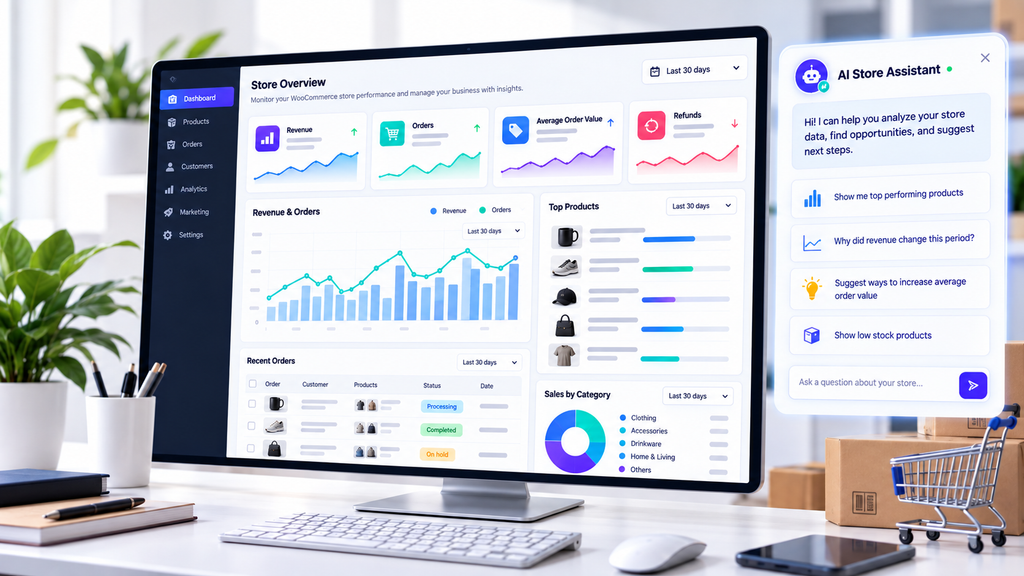
You open your WooCommerce dashboard and see revenue, order counts, and product sales. The numbers are useful, but they do not always explain what changed, why a product is underperforming, or which part of your business deserves attention next.
A WooCommerce AI business assistant can help bridge that gap by turning store data into questions, explanations, and ideas for further investigation. Instead of looking at a chart and guessing what it means, you can start with a specific business question and use the available data to explore possible answers.
In this guide, you will learn how to analyze WooCommerce sales, which metrics matter, how to ask better questions, and how Shop Explorer by WPAzleen approaches store analytics and AI assisted revenue analysis.
One important distinction: analytics dashboards and AI analysis are not the same feature. Shop Explorer documents a sales analytics dashboard, while its feature reference identifies the interactive AI Revenue Analyst as a Pro feature. Check the current version and plan before expecting AI generated business recommendations.
Table of Contents
- What Is a WooCommerce AI Business Assistant?
- Why Sales Data Needs Interpretation
- 7 Sales Metrics Worth Understanding
- How Shop Explorer Supports Sales Analysis
- How to Ask Better Business Questions
- A Practical Sales Analysis Example
- Turn Findings Into Actions
- Comparing WooCommerce Analytics Tools
- What an AI Business Assistant Cannot Guarantee
- Frequently Asked Questions
What Is a WooCommerce AI Business Assistant?
A WooCommerce AI business assistant is a tool that helps store owners investigate business questions using available store data. Depending on its capabilities and the data it can access, it may explain sales trends, compare periods, identify products worth investigating, or suggest follow up questions.
For example, you might ask why revenue fell this week, which products contributed most to sales, or whether a higher order count also produced a higher average order value. The assistant can help organize the investigation, but the reliability of its answer depends on the underlying data, the calculations, and the features available in the tool.
A regular analytics dashboard shows metrics and charts for you to interpret. An AI business assistant adds a conversational analysis layer when the relevant AI feature is available. These approaches complement each other rather than replacing the need for accurate reporting.
Why WooCommerce Sales Data Needs Interpretation
Sales numbers can move for many reasons. A revenue increase might come from more orders, higher prices, a popular product, or a temporary promotion. A decline might reflect fewer orders, refunds, discounting, product availability, or normal variation in demand.
Looking at only one number can hide the real story. If revenue rises while order count falls, for example, the average value of each order may have increased. If order count rises but net sales barely change, the store may be attracting smaller purchases or offering larger discounts.
A WooCommerce AI business assistant can help you frame these questions and examine the relevant metrics. It should not be treated as proof of a cause unless the data supports that conclusion. A correlation between two trends does not automatically mean one caused the other.
7 Sales Metrics Worth Understanding
Before asking AI to interpret your store, understand the basic metrics. WooCommerce Analytics defines these figures separately because revenue, sales, refunds, and order value are not interchangeable. See the official WooCommerce Analytics documentation for its reporting definitions.
1. Net sales
Net sales generally represent gross sales minus returns and coupons under WooCommerce Analytics definitions. This is useful when you want to examine sales after those deductions. Check the exact report definition in your analytics tool before comparing numbers across platforms.
2. Total sales and revenue components
WooCommerce total sales includes net sales adjustments along with taxes and shipping, according to its reporting definitions. Always distinguish product sales from taxes and shipping charges so that your analysis uses the right measure for the question.
3. Order count
Order count tells you how many orders were placed in a selected period, based on the report’s date and order status settings. Compare it with a previous period to see whether order volume is rising or falling. Check which statuses are included before drawing conclusions.
4. Average order value
Average order value, or AOV, is a useful indicator of how much customers spend per order. WooCommerce Analytics calculates it as net sales divided by orders. AOV can change when product mix, discounts, bundles, or customer buying patterns change.
5. Product performance
Product reports help you compare products by sales and items sold. A high selling product is not necessarily the most profitable product. To evaluate profitability, you also need reliable cost information and any other expenses that apply to the product.
6. Refunds and discounts
Refunds and coupon discounts can change how much revenue the store retains. If sales appear strong but net sales are weaker, investigate returns and discounting rather than assuming the business is performing well from gross sales alone.
7. Sales trends over time
Daily numbers can be noisy. Comparing complete periods, such as this week with the previous week or this month with the same month last year, can provide more useful context. Keep date ranges and order status settings consistent to make the comparison meaningful.
How Shop Explorer Supports WooCommerce Sales Analysis
Shop Explorer by WPAzleen brings WooCommerce store management and analytics into a dedicated interface. Its documented analytics dashboard includes revenue information, order trends, average order value, product performance, and customer related metrics. The exact views and available date ranges depend on the installed version and plan.
Start with the analytics dashboard
Use the available dashboard to review the metrics and charts that describe your store’s activity. Start by checking the selected period, the reported revenue measure, and which order statuses are included. These details help prevent comparisons that look meaningful but use different definitions.
Identify a question worth investigating
Look for a meaningful change rather than trying to explain every small movement. For example, you might notice that orders increased while net sales stayed flat, or that one product contributes a large share of revenue. Use those observations to decide what to investigate next.
Use AI revenue analysis when it is available
Shop Explorer’s feature reference lists an interactive AI Revenue Analyst under Pro functionality. Where this feature is available in your installed version, it is intended to help users ask questions about store performance and explore business insights. Confirm the current plan and interface before following a specific AI workflow.
When using an AI analysis feature, give it a focused question, review the metrics or evidence behind its answer, and ask follow up questions when an explanation is unclear. Do not treat an AI generated recommendation as a verified financial result.
Connect findings to store operations
Analytics becomes more useful when it informs a practical next step. If a product appears to be selling slowly, inspect its stock availability, price, description, and recent order history. If refunds rise, examine the affected products and order details. Shop Explorer also provides product and order management tools that can help you investigate the operational side of a finding.
How to Ask Better Questions With a WooCommerce AI Business Assistant
Broad questions such as “How is my store doing?” may produce broad answers. Better questions specify a period, a metric, and the comparison you want to understand. Use these examples as question templates if your AI tool supports the relevant data and analysis.
Revenue questions
Compare net sales for the current complete week with the previous complete week. Identify the size and direction of the change. Separate confirmed observations from possible explanations, and tell me which report or metric I should inspect next.
Product performance questions
Which products contributed the most to net sales during the selected period? Compare sales and items sold where the data is available. Identify products with notable changes and explain what additional information would be needed to assess profitability.
Order value questions
Compare order count and average order value for the current period with the previous period. Explain whether the change in net sales appears more closely associated with order volume or order value. Show the relevant figures and note any missing information.
Refund and discount questions
Review refunds and coupon discounts for the selected period. Compare them with the previous period if comparable data is available. Identify the largest changes and suggest which orders, products, or coupon reports I should inspect to understand them.
These prompts are examples for a capable AI analysis tool. They are not claims that every prompt is supported by Shop Explorer in every version. The assistant must have access to the relevant data before it can answer reliably.
A Practical WooCommerce Sales Analysis Example
Consider a hypothetical store comparing two complete weeks. The following figures are illustrative only and are not Shop Explorer performance results.
| Metric | Previous week | Current week | Change |
|---|---|---|---|
| Net sales | $5,000 | $5,400 | +8% |
| Orders | 100 | 90 | −10% |
| Average order value | $50 | $60 | +20% |
At first glance, net sales improved. However, the store received fewer orders. Average order value increased enough to offset the lower order count, so looking at revenue alone would miss an important part of the story.
What should the store owner investigate?
- Check whether a higher priced product accounted for a larger share of orders.
- Review promotions and bundles that might have increased the amount spent per order.
- Compare product availability to see whether popular products were out of stock.
- Inspect refunds and discounts using the same reporting definitions across both periods.
- Check whether the two periods contain comparable trading days or unusual events.
An AI assistant could help organize this investigation if it has access to the necessary metrics and product data. The figures alone do not prove why the change occurred. The store owner should verify the likely explanation in the relevant reports before changing prices, stock levels, or marketing activity.
Turn Sales Findings Into Practical Actions
The goal of a WooCommerce AI business assistant is not simply to produce more commentary. Its value is in helping you move from a question to a useful investigation and then to a decision supported by evidence.
When order count falls
Compare the same period with a previous period, then inspect product availability, order statuses, and any relevant marketing changes. Avoid assuming that the decline is caused by pricing or marketing until you have evidence for that explanation.
When a product underperforms
Review its sales history, stock status, price, variations, and product page content. If demand appears weak, investigate further before ordering more inventory or making a major pricing change.
When revenue rises but profitability is unclear
Revenue is not the same as profit. To evaluate profitability, you need accurate cost of goods sold and relevant expenses, including any shipping, transaction, advertising, or operating costs that apply. Do not label a revenue increase as a profit increase without those figures.
When refunds increase
Identify which products and orders are involved. Check for patterns in product descriptions, fulfillment, customer expectations, or quality issues. Treat these as possible areas to investigate rather than confirmed causes until you have supporting evidence.
Comparing WooCommerce Analytics Tools
Different analytics tools solve different problems. Native WooCommerce Analytics is a useful starting point for standard reporting. Dedicated analytics platforms may offer additional reporting, customer analysis, or AI interaction. A store management plugin can be attractive when you want analytics alongside daily operational tools.
| Tool | What it offers | Best fit | Considerations |
|---|---|---|---|
| WooCommerce Analytics | Revenue, orders, products, customers, filters, date comparisons, and CSV reports | Store owners who need built in reporting | Interpreting patterns and deciding what to investigate remains your responsibility |
| Shop Explorer | Store management tools with a documented analytics dashboard and a Pro AI Revenue Analyst | Store owners who want operations and analytics in one plugin | Verify the current plan, version, and availability of AI analysis features |
| Metorik | Dedicated ecommerce reporting, profit tracking, customer analysis, and an AI assistant called Tori | Stores that need a specialized analytics service | Review its subscription plans, integrations, and data requirements |
WooCommerce documents built in reports, filters, and CSV downloads. Metorik documents its Tori AI assistant for questions about sales, revenue, products, customer behavior, and reports. Shop Explorer combines store management with analytics and documents an AI Revenue Analyst in Pro. These products have overlapping but different scopes, so compare the workflows and current feature availability rather than assuming they are interchangeable.
For a closer look at the reporting tools, see the WooCommerce Analytics documentation and Metorik’s Tori AI assistant documentation.
What an AI Business Assistant Cannot Guarantee
- Perfect explanations: an observed change may have several possible causes.
- Accurate profit without cost data: revenue and order figures alone do not establish profitability.
- Access to every store metric: answers depend on which data the tool can actually read.
- Consistent comparisons without matching settings: date ranges, time zones, order statuses, refunds, and metric definitions matter.
- Guaranteed business growth: recommendations need to be tested and evaluated against real results.
- Identical features across plans: confirm the installed version and plan before relying on AI analysis, historical comparisons, or advanced filters.
Frequently Asked Questions
What is a WooCommerce AI business assistant?
It is an AI powered tool that helps store owners investigate business questions using available store data. Depending on the tool, it may explain sales trends, compare performance, and suggest follow up investigations.
Does WooCommerce include AI sales analysis by default?
WooCommerce includes built in Analytics reports, filters, charts, and CSV downloads. Conversational AI analysis is a separate capability and should not be assumed to be included in the core reporting interface.
Does Shop Explorer have an AI Revenue Analyst?
Shop Explorer’s feature reference identifies an interactive AI Revenue Analyst as a Pro feature. Check the current Shop Explorer product information and your installed version to confirm its availability before planning your workflow around it.
Can an AI assistant tell me why sales dropped?
It can help examine relevant metrics and suggest possible explanations when it has access to the data. A sales drop can have multiple causes, so verify the explanation against order, product, refund, inventory, and marketing information before acting.
Can AI calculate WooCommerce profit?
AI can help interpret profitability reports, but accurate profit calculations require reliable cost and expense data. Revenue alone is not profit. Confirm which costs are included in the report before relying on a result.
What questions should I ask an AI sales assistant?
Start with focused questions about net sales, order count, average order value, top selling products, refunds, or comparisons between equivalent periods. Ask the assistant to distinguish observed facts from possible explanations and to identify any missing data.
Is Shop Explorer an alternative to Metorik?
They overlap in store analytics, but they have different product scopes. Shop Explorer combines store management tools with analytics, while Metorik is a dedicated ecommerce analytics service with reporting and an AI assistant. Compare current plans, integrations, data coverage, and workflows before choosing.
Make Better WooCommerce Decisions With Shop Explorer
Good sales analysis starts with reliable data and the right questions. By comparing net sales, orders, average order value, product performance, refunds, and trends over consistent periods, you can move beyond surface level numbers and identify what deserves a closer look.
Shop Explorer by WPAzleen brings store management and analytics together, with an AI Revenue Analyst documented as a Pro feature. Review the current feature availability, explore your store metrics, and use evidence to guide your next decision.
Shop Explorer is developed by WPAzleen. Features and plan availability may change. Check the current product documentation before relying on a particular AI analysis workflow.









Leave a Comment
Your email address will not be published. Required fields are marked *