
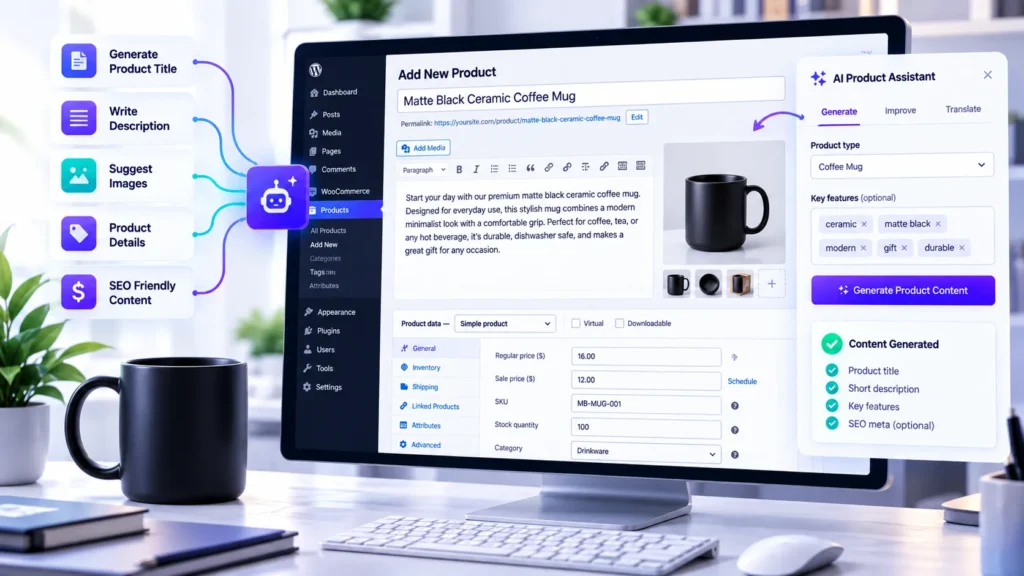
Creating product listings is one of the most repetitive jobs in an online store. You need a clear title, a useful short description, a detailed product description, accurate categories, and the right product data. When your catalog contains dozens or hundreds of items, writing everything manually can slow down launches and leave important listings unfinished.
A WooCommerce AI product generator can help you move from a brief product idea to a structured listing much faster. Instead of starting with a blank editor, you provide the product details and let AI prepare a draft that you can review, improve, and save.
In this guide, you will learn how AI product generation works, how to write better prompts, what to review before publishing, and how Shop Explorer by WPAzleen brings AI content generation directly into the WooCommerce product editor.
Table of Contents
- What Is a WooCommerce AI Product Generator?
- Why Product Content Matters
- What Can AI Generate for a Product?
- How Shop Explorer Generates Product Content
- 7 Powerful Ways to Improve Product Listings With AI
- Practical AI Prompt Examples
- How to Keep AI Product Content Accurate and SEO Friendly
- Shop Explorer Compared With Other AI Product Tools
- Common Mistakes to Avoid
- Frequently Asked Questions
What Is a WooCommerce AI Product Generator?
A WooCommerce AI product generator is a tool that uses an artificial intelligence model to help create product information for an online store. Depending on the tool, it can draft product titles, short descriptions, full descriptions, suggested SKUs, prices, stock values, and category tags from a short prompt.
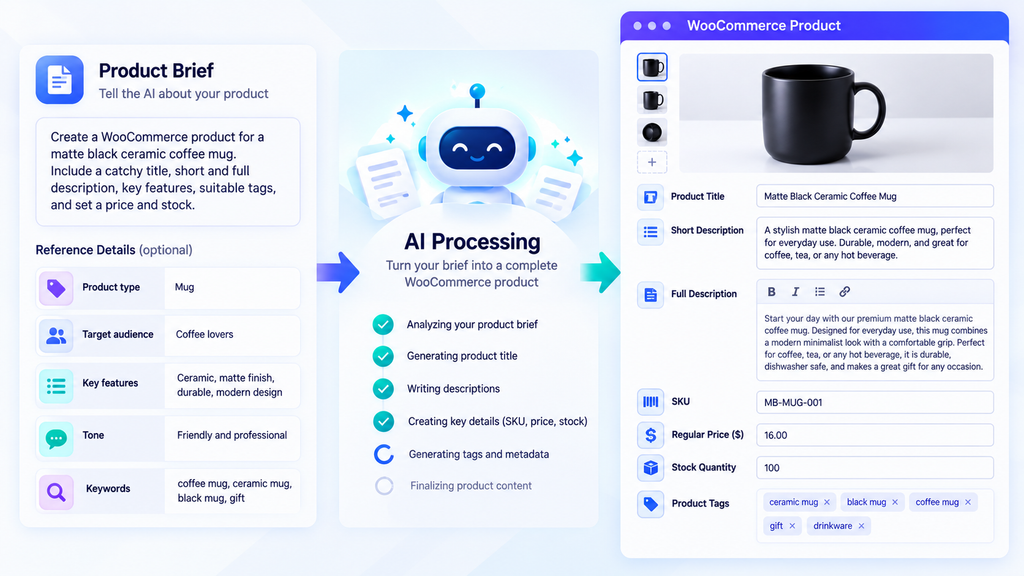
For example, imagine that you are adding a matte black ceramic coffee mug with a capacity of 350 ml. You could provide that information in a prompt and ask AI to prepare a product title and description. You then review the generated draft and confirm every product detail before saving it.
A WooCommerce AI product generator is most useful when it removes repetitive writing from your workflow without removing your control over the final listing. AI should help you prepare content, not make unverified decisions about the products you sell.
Why Product Content Matters for Your WooCommerce Store
Product pages help shoppers understand what they are buying. A vague title or an empty description forces customers to guess. A well organized listing explains the product, highlights relevant benefits, and gives buyers the information they need to make a decision.
Writing every listing from scratch becomes difficult as a catalog grows. Store owners may reuse the same generic wording, forget important attributes, or postpone new product launches because the content is not ready.
A WooCommerce AI product generator can make the first draft easier to produce. It can also give your team a repeatable starting point for writing product content in a consistent tone. The final quality still depends on the accuracy of your source information and the review process you follow.
What Can AI Generate for a Product?
With Shop Explorer, the AI content generation workflow is designed to populate several product fields from a single prompt. When AI integration is enabled and configured, the product editor can generate the following information:
| Product field | How AI can help | What to verify |
|---|---|---|
| Product title | Suggest a clear and descriptive name | Brand, model, size, and product identity |
| Short description | Summarize the main selling points | Key features and customer expectations |
| Full description | Create structured product copy | Materials, specifications, benefits, and claims |
| SKU suggestion | Propose an identifier for the product | Uniqueness and your inventory naming rules |
| Regular price | Suggest a value when requested by the prompt | Your actual approved selling price |
| Stock quantity | Populate a suggested quantity when requested | Your real inventory count |
| Category tags | Suggest relevant categorization terms | Your existing taxonomy and store structure |
These generated fields are starting points, not proof of accuracy. In particular, AI cannot know your actual stock count, approved price, or internal SKU unless you supply reliable information or verify the result against your store records.
How Shop Explorer Works as a WooCommerce AI Product Generator
Shop Explorer combines product management tools with AI content generation inside the WooCommerce administration workflow. Instead of drafting product copy in a separate chat window and manually transferring each field, you can start from the product editor and generate a structured draft there.
Step 1: Configure your AI provider
Open the Shop Explorer settings and find the AI Integration section. Enable AI integration, select a supported provider and model, enter the required API key, and use the Test Connection option to verify the configuration before saving.
Shop Explorer documentation describes support for providers including Google Gemini, OpenAI, Anthropic Claude, DeepSeek, and OpenRouter. Available models can change over time, so check the model choices in your installed version. Provider usage may incur separate charges under your own API account.
Step 2: Open the WooCommerce product editor
Go to Products and choose Add Product, or open an existing product that needs better content. Find the Generate with AI control in the product editor. The AI generation action becomes available when the integration is enabled and configured.
Step 3: Describe the product clearly
Enter a concise prompt containing the facts you know about the product. Include its name, material, dimensions, intended use, confirmed features, target audience, and preferred writing style when relevant. The more useful product information you provide, the easier it is to assess the generated result.
Step 4: Generate and review the fields
Run the generator and review the returned title, short description, full description, SKU suggestion, price, stock quantity, and tags. Not every field should be accepted automatically. Compare factual details with your supplier information, inventory records, and pricing rules.
Step 5: Save only after checking the draft
Correct inaccurate claims, improve awkward wording, confirm the product settings, and save the listing when it is ready. If you are updating an existing product, compare the generated content with the current version before replacing anything important.
This review first workflow makes a WooCommerce AI product generator useful without handing full editorial control to a model.
7 Powerful Ways to Improve Product Listings With AI
1. Turn brief product notes into complete drafts
You do not need to write a polished paragraph before using AI. Start with a factual list of product details and ask the generator to turn them into readable copy. This can be particularly helpful when importing products from suppliers or launching a new collection.
2. Make product titles more descriptive
A title should help shoppers identify the product quickly. Ask AI to organize the product type, material, size, model, or other useful attributes without stuffing the title with repeated keywords. Always retain the official model name and any essential identifiers.
3. Write clearer short descriptions
Short descriptions should communicate the most important details at a glance. Use AI to create a concise summary based on confirmed features, then remove generic claims that do not help a shopper understand the product.
4. Structure longer descriptions for easy scanning
Long descriptions are easier to read when they have useful headings, short paragraphs, and clearly stated specifications. Ask AI to organize the supplied information into a sensible structure rather than adding unnecessary filler or unsupported promises.
5. Create a more consistent brand voice
Set a preferred tone such as friendly, practical, premium, or technical in your prompt. Reusing a style guide can help different product pages feel consistent, although every draft should still be reviewed for natural wording and accuracy.
6. Organize tags and product details more consistently
AI can suggest relevant tags and categorization terms from the product details you provide. Compare those suggestions with your existing WooCommerce categories and tags before applying them. Similar products should follow a consistent taxonomy so shoppers can navigate your catalog more easily.
7. Reduce the gap between product creation and publishing
When the initial title and description are easier to prepare, your team can spend more time checking photos, variations, stock, prices, and shipping information. AI does not replace these tasks, but it can remove some of the repetitive writing that delays a listing from becoming ready to publish.
Practical AI Prompt Examples for WooCommerce Products
A strong prompt gives the model enough information to write useful copy while making it clear which facts must not be invented. Use the examples below as starting points and replace the sample details with verified information about your own products.
Example 1: Everyday product
Create a WooCommerce product listing for a matte black ceramic coffee mug with a confirmed capacity of 350 ml.

Write a clear product title, a concise short description, and a structured full description. Highlight only the supplied product details. Use a friendly, professional tone. Do not invent dishwasher safety, microwave safety, country of origin, warranty, or other specifications. Suggest relevant product tags and an SKU format, but mark any unverified values for review.
Example 2: Technical product
Prepare a WooCommerce product listing using the following verified details: [insert product name, model, dimensions, materials, compatibility, and included accessories].

Create a precise title, a short summary, and a detailed description with a specifications section. Keep model numbers and measurements unchanged. Do not assume compatibility with products that are not listed. Use a clear technical tone and suggest relevant tags.
Example 3: Existing product description rewrite
Rewrite the existing WooCommerce product description to improve clarity, structure, and readability.

Keep every confirmed specification, measurement, limitation, and compatibility detail unchanged. Remove repetition and vague marketing claims. Do not introduce new features or promises. Return a short description and a full description with useful headings.
These prompts can also be adapted when using the Generate with AI workflow in Shop Explorer. Review every output before saving, especially where the prompt asks for commercial details such as price or stock quantity.
How to Keep AI Product Content Accurate and SEO Friendly
Using a WooCommerce AI product generator does not automatically make a product page rank well in search results. The result still needs to be useful to shoppers, based on accurate information, and organized around the product’s real purpose.
Use the right keyword naturally
Identify the search phrase that accurately describes the product. Include it naturally in the title or relevant copy where it makes sense. Avoid repeating the same phrase unnaturally across every sentence or giving unrelated products identical descriptions.
Supply real specifications
Give the generator confirmed details such as dimensions, materials, compatibility, care instructions, included accessories, and product limitations. Never rely on AI to guess a technical specification or safety claim. Verify those details against the supplier’s documentation or your own product records.
Make every listing specific to its product
Avoid using the same generic description for an entire category. Provide the attributes that make each product different and check the output for duplicated wording. Useful product content answers genuine customer questions instead of simply adding more words to a page.
Check titles, metadata, and images separately
Product descriptions are only one part of on page optimization. Review your SEO title, meta description, image alt text, product images, internal links, and structured product information separately. Do not assume that generating a description also updates every SEO field in your setup.
Keep a human approval step
Before publishing, confirm factual accuracy, brand voice, spelling, prices, stock, and variation details. For a large catalog, use a repeatable checklist and prioritize high traffic products or listings with missing content first.
Shop Explorer Compared With Other AI Product Tools
There are several ways to generate WooCommerce product content. Some tools focus only on AI writing, while others offer a wider store management workflow. The best fit depends on whether you need a dedicated content tool or want AI generation alongside everyday product administration.
| Tool | Main approach | What to consider |
|---|---|---|
| Shop Explorer | AI product content inside a broader WooCommerce management plugin | Useful if you also want product editing and store management tools in the same admin workflow |
| AI Product Content Generator | Focused AI content generation in the WooCommerce product editor | Useful when your main requirement is writing product descriptions, titles, and meta descriptions |
| Kestrel AI for WooCommerce | AI product copy and review response assistance | A paid extension with its own subscription pricing and support terms |
| StoreAgent | Product content generation with broader AI store tools | Worth evaluating if bulk content generation and an account based AI service fit your workflow |
This comparison describes the tools’ publicly documented positioning, not a claim that one product wins every feature test. Pricing, limits, provider support, and available functionality can change. Check each official listing before making a purchase or choosing a production workflow.
Shop Explorer’s main distinction is its broader administration approach: AI content generation sits alongside product editing and other WooCommerce management tools. If your priority is only bulk writing across a large catalog, compare the exact bulk workflow and approval controls offered by each product before choosing.
Common Mistakes to Avoid When Using AI for Product Content
- Publishing without review: AI generated text can contain errors or unsupported claims.
- Using vague prompts: A prompt with no real product information often produces generic content.
- Accepting suggested prices blindly: Confirm prices against your business rules and current costs.
- Trusting generated stock quantities: Always compare stock with your inventory records.
- Creating duplicate descriptions: Give each product its own confirmed attributes and useful differentiators.
- Overusing keywords: Write for shoppers first and use search phrases naturally.
- Ignoring API costs: If you connect your own AI provider, review its usage and billing terms.
Frequently Asked Questions
What is a WooCommerce AI product generator?
It is a tool that uses AI to draft product information such as titles, short descriptions, full descriptions, tags, and sometimes other product fields. The generated information should be reviewed before it is saved or published.
Can Shop Explorer generate full WooCommerce product descriptions?
Shop Explorer’s documented AI product content workflow can generate a product title, short description, full description, SKU suggestion, regular price, stock quantity, and categorization tags from a single prompt. Availability depends on having AI integration configured in the installed version.
Do I need an AI API key to use Shop Explorer’s generator?
The documented workflow connects Shop Explorer to a supported AI provider using your provider API key. The provider may charge separately for usage, so review the provider’s current pricing and terms before generating content at scale.
Can AI choose the correct product price and stock quantity?
AI can suggest or populate values, but it cannot independently guarantee your approved price or actual inventory count. Confirm these values using your business rules and inventory records before saving the product.
Will AI generated product descriptions improve SEO?
They can help you create clearer, more complete product content, but rankings are not guaranteed. Product accuracy, usefulness, page experience, competition, and other SEO factors also matter. Review the content and optimize the rest of the product page separately.
Can I edit AI generated content before publishing?
Yes. Treat the generated result as a draft. Review the fields, correct inaccurate details, adjust the tone, and save only when the listing meets your store’s quality standards.
Is Shop Explorer only an AI writing plugin?
No. Shop Explorer is positioned as a broader WooCommerce store management plugin that also includes AI content generation. Its other documented areas include product editing, order management, customer management, invoices, expense tracking, review moderation, and analytics.
Create Better WooCommerce Product Listings With Shop Explorer
Writing product content should not become the bottleneck that holds back your store. A WooCommerce AI product generator can help you prepare titles and descriptions faster, establish a consistent writing workflow, and spend more time checking the details that matter to customers.
Shop Explorer by WPAzleen brings AI product content generation into the WooCommerce product editor and combines it with a wider set of store management tools. Configure your AI provider, start with a clear prompt, and review every generated field before saving.
Shop Explorer is developed by WPAzleen. Review the current plugin documentation and version details to confirm feature availability before relying on a specific workflow.







Leave a Comment
Your email address will not be published. Required fields are marked *