
Every WooCommerce store has customers who buy once and never return, customers who order occasionally, and customers who come back whenever they need something. The challenge is understanding those differences and using that information to improve how you serve them.
WooCommerce customer management helps you organize customer records, review purchase history, understand customer value, and identify useful patterns in buying behavior. Instead of treating every buyer the same way, you can use available data to decide which customers may benefit from a thank you message, a relevant offer, or more attentive support.
In this guide, you will learn how to manage WooCommerce customers, identify your best buyers, understand customer lifetime value, organize customer segments, and use Shop Explorer by WPAzleen to keep customer information accessible alongside everyday store management.
The goal is not to label customers permanently or assume that spending more always means greater profit. It is to make better decisions using purchase history, order patterns, and reliable customer data.
Table of Contents
- What Is WooCommerce Customer Management?
- Why Customer Data Matters
- 7 Ways to Identify Your Best Buyers
- Understand Customer Lifetime Value
- How Shop Explorer Helps Manage Customers
- How to Segment WooCommerce Customers
- A Practical Customer Management Workflow
- Comparing Customer Management Tools
- Customer Data, Privacy, and Responsible Use
- Frequently Asked Questions
What Is WooCommerce Customer Management?
WooCommerce customer management is the process of organizing customer information and using it to support sales, customer service, retention, and store operations. Depending on your tools and configuration, this can include customer records, contact information, order history, spending metrics, internal notes, and customer tags.
WooCommerce provides customer information through its order and customer administration features. Additional management tools can make it easier to search customer records, review purchase history, identify repeat buyers, and organize customers into useful groups.
Good customer management is more than storing email addresses. It helps answer practical questions: Who has purchased repeatedly? Which customers have the highest recorded lifetime value? Who has not ordered for a while? Which customers need help with an existing order?
Why Customer Data Matters for an Online Store
Without an organized customer view, it can be difficult to recognize buying patterns across multiple orders. A customer may have purchased several times, but the team might only see the latest transaction when handling a support request.
Customer records and purchase history can help you provide more relevant support, recognize repeat buyers, identify opportunities for retention, and understand which products attract valuable customer relationships.
Customer data also needs context. A large order does not necessarily mean a customer will return, and a customer with modest purchases may become valuable over time. Returns, discounts, fulfillment costs, and other expenses can affect profitability, so use spending metrics as indicators rather than complete measures of business value.
7 Ways to Identify Your Best WooCommerce Buyers
The best way to identify valuable customers is to combine several signals instead of relying on one ranking. These seven approaches provide a practical starting point for WooCommerce customer management.
1. Look at customer lifetime value
Customer lifetime value, often abbreviated as CLV or LTV, represents the value associated with a customer’s purchases over time. The exact calculation depends on the reporting tool. Some tools use customer revenue or net sales, while others can incorporate product costs and other expenses to estimate profit.
Use lifetime value to identify customers who have contributed substantially to your store over their recorded history. Then check the metric definition, refunds, and available cost data before treating the ranking as a measure of profitability.
2. Identify repeat purchasers
Repeat customers have placed more than one order. They can be important because they have already completed a purchase and may have an established relationship with your store.
Review order counts and purchase history to identify returning buyers. Compare repeat purchasing patterns by product category or first purchase when your reporting tools support those views. Do not assume that every repeat customer will continue buying at the same rate.
3. Find customers with high order frequency
Some customers place orders more frequently than others. This can be especially relevant for products that customers regularly replenish, use in their businesses, or buy as part of a recurring routine.
Compare the number of orders and the time between purchases where that information is available. If a previously frequent customer stops ordering, consider whether a relevant follow up or service check is appropriate. A gap in orders is a signal to investigate, not proof that the customer has left permanently.
4. Review average order value
Average order value shows how much customers spend per order on average under the selected reporting definition. Customers with a higher average order value may be purchasing premium products, bundles, or multiple items in a single transaction.
Use average order value alongside order frequency and lifetime spending. A customer who places one large order and a customer who places many smaller orders can have very different relationships with your business.
5. Identify customers who may be becoming inactive
Customers who have not purchased for a long time may deserve a closer look, especially if they previously ordered frequently. The right inactivity period depends on your product cycle. A customer who buys household supplies every month behaves differently from someone who buys furniture once every few years.
Choose a reasonable period based on your store’s normal purchase patterns. Where available, use a dormant or at risk tag as a way to organize follow up work. Avoid treating an automated label as a definitive prediction of customer behavior.
6. Examine refunds and discount behavior
A customer’s total spending tells only part of the story. Frequent refunds, heavy discount use, and other transaction patterns can change how you interpret a customer’s contribution to the business.
Review these signals carefully and in context. A customer who uses coupons is not automatically a poor customer, and a refund may reflect a problem with a product or fulfillment process rather than the customer’s behavior. Use the data to investigate service improvements, not to make unfair assumptions about individuals.
7. Combine purchase history with customer context
Purchase metrics become more useful when considered alongside the customer’s actual relationship with your store. Product preferences, order history, support notes, and relevant customer tags can help your team provide more informed service.
For example, a support agent who can review a customer’s recent orders and internal notes may be better prepared to answer a question without asking the customer to repeat information. Keep notes factual, relevant, and professional, and record only information your team genuinely needs.
Understand Customer Lifetime Value Without Misreading It
Customer lifetime value helps you compare customer relationships over time, but it is important to know which version of the metric you are using. A report based on historical revenue answers a different question from a report based on profit after costs.
| Metric | What it tells you | What it does not prove |
|---|---|---|
| Total customer spending | How much the customer has spent under the report’s definition | Actual profit after all costs |
| Order count | How many qualifying orders are recorded | Whether the customer will order again |
| Average order value | Average spending per qualifying order | Long term customer loyalty |
| Time since last order | How long it has been since the recorded purchase | That the customer has permanently churned |
| Profit based lifetime value | An estimate of customer contribution after included costs | Full business profitability if important costs are missing |
Use these metrics together rather than creating a customer ranking from a single number. The most useful customer view depends on your business model, purchase cycle, and the quality of the data you collect.
How Shop Explorer Helps With WooCommerce Customer Management
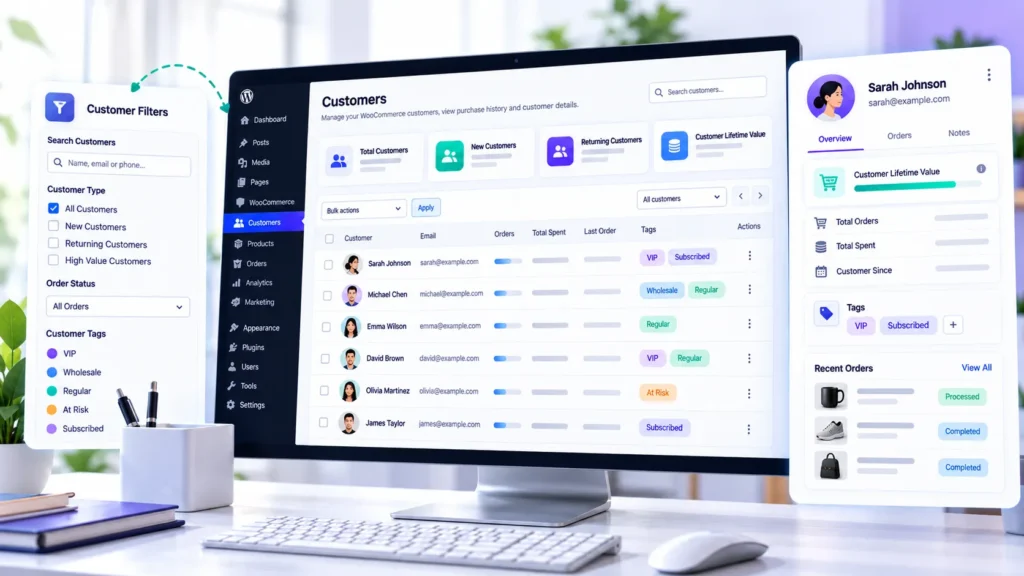
Shop Explorer by WPAzleen includes a customer management area alongside its WooCommerce product and order tools. Its public plugin listing documents a customer database with search and filtering, customer profiles, lifetime value, purchase history, tags, notes, customer detail editing, and CSV export.
Review customer profiles and purchase history
A customer profile helps bring relevant information together, such as recorded purchases, lifetime value, customer tags, and internal notes. This is useful when reviewing customer activity or preparing to respond to a support request.
Start by searching for the customer and checking the recorded details. Confirm that the orders and values shown match the information you need before using them to make a business decision.
Use customer tags to organize follow up work
Shop Explorer’s public listing describes rule based and manual customer classification. Documented tag examples include VIP Customer, At Risk Customer, New Customer, Loyal Customer, Big Spender, Discount Hunter, Frequent Buyer, and Dormant.
These tags can make a customer list easier to understand and help your team focus on particular groups. Review the tag criteria in your installed version and make sure each label reflects useful, current information rather than an assumption about a customer’s intentions.
Add internal notes for better service
Internal notes can help a team keep track of relevant customer service context. For example, a note might record that a replacement was arranged or that a delivery issue was resolved. Keep notes concise and avoid recording sensitive or unnecessary personal details.
Export customer data when needed
Shop Explorer documents customer CSV export. Exporting records can support analysis in a spreadsheet or approved reporting workflow. Before sharing a file, check which fields it contains, who needs access, and whether the transfer complies with your store’s privacy and data handling policies.
For the current feature list and installation details, visit the Shop Explorer WordPress.org listing and the WPAzleen documentation.
How to Segment WooCommerce Customers
Customer segmentation means organizing buyers into groups using shared characteristics or behaviors. A useful segment should help you answer a question or plan an appropriate action.
| Customer segment | Possible criteria | Useful next step |
|---|---|---|
| New customers | One qualifying purchase or first recorded order | Provide useful onboarding information and clear support options |
| Repeat customers | More than one qualifying order | Understand which products bring customers back |
| High value customers | High recorded lifetime spending or another defined value metric | Offer relevant service and recognize the relationship appropriately |
| Frequent buyers | Order frequency above a chosen threshold | Review repeat purchase timing and replenishment needs |
| At risk customers | Purchase inactivity relative to the expected buying cycle | Investigate whether a useful, respectful follow up is appropriate |
| Discount focused buyers | Frequent coupon use under defined rules | Assess promotion performance and customer response |
The criteria above are examples for planning segments, not universal thresholds. Use the tag rules or filters available in your installed tool, and tailor the criteria to your products and normal purchase cycles.
A Practical WooCommerce Customer Management Workflow
You do not need to build dozens of customer segments on day one. Start with a small workflow that your team can maintain consistently.
- Review the customer list. Search for customers and confirm that the recorded information is accurate.
- Check purchase history. Review order count, recent purchases, and lifetime value where available.
- Choose a useful segment. Start with new customers, repeat buyers, high value customers, or customers who may be inactive.
- Review the criteria. Confirm how the segment is defined and whether refunds or guest orders affect the result.
- Decide on a relevant action. This might be improved support, a helpful product recommendation, or a retention message where appropriate.
- Measure the result. Review subsequent purchases, customer feedback, and relevant business metrics instead of assuming the action worked.
- Keep customer information current. Update relevant notes and review tags periodically so outdated labels do not drive decisions.
This process turns WooCommerce customer management into a repeatable business routine instead of an occasional export that quickly becomes outdated.
Comparing WooCommerce Customer Management Tools
Different tools approach customer data from different angles. Some focus on managing records inside WordPress, while others emphasize detailed reporting, segmentation, and customer retention analysis.
| Tool | Documented strengths | Best fit | Considerations |
|---|---|---|---|
| Shop Explorer | Customer profiles, purchase history, lifetime value, tags, notes, search, filtering, and CSV export | Store owners who want customer management alongside product and order operations | Confirm the current version’s filters, tag behavior, and export fields |
| WooCommerce Customer Analytics | Customer reports and customer related metrics in the WooCommerce reporting system | Store owners who want built in reporting without starting with a separate analytics service | Review the report definitions and available segmentation options |
| Metorik | Customer reports, lifetime value, retention, cohorts, and detailed segmentation | Stores that need dedicated customer analytics and more extensive reporting | Evaluate subscription costs, integrations, and data requirements |
WooCommerce documents customer analytics for reporting customer value and retention. Metorik documents customer reports, repeat purchase analysis, lifetime value, and detailed segmentation. Shop Explorer combines customer records and tagging with broader store management tools. These products serve overlapping but different needs, so compare the workflows that matter to your store rather than assuming one tool is best for every situation.
For current details, consult the official WooCommerce Customer Analytics documentation and Metorik customer reports documentation.
Customer Data, Privacy, and Responsible Use
Customer records can contain personal information. Restrict access to staff who need it, use appropriate permissions, and share exported data only through approved channels. Follow the privacy laws and retention requirements that apply to your business and customers.
Keep internal notes professional and relevant to customer service. Avoid sensitive personal judgments, unsupported assumptions, and information that your team does not need to perform its work.
Customer tags should support helpful service, not become permanent labels. Review them periodically, correct outdated records, and allow customers to be understood in context. A customer who has not ordered recently may simply have no current need for your products.
Frequently Asked Questions
What is WooCommerce customer management?
WooCommerce customer management involves organizing customer records, reviewing purchase history, understanding customer value, and using relevant information to improve service and retention.
How can I identify my best WooCommerce customers?
Review several signals together, including lifetime value, repeat orders, order frequency, average order value, refunds, and the time since the last purchase. Define what “best” means for your business before ranking customers.
What is customer lifetime value in WooCommerce?
Customer lifetime value estimates the value associated with a customer’s purchases over time. The exact calculation depends on the reporting tool and whether it measures revenue or includes costs to estimate profit.
Can Shop Explorer organize customers with tags?
Shop Explorer’s public listing documents manual and rule based customer tagging, with examples including VIP Customer, New Customer, Loyal Customer, Frequent Buyer, At Risk Customer, and Dormant. Confirm the current tag rules in your installed version.
Can I view customer purchase history in Shop Explorer?
Shop Explorer’s public feature list documents customer profiles with purchase history and lifetime value. Use the current plugin listing and documentation to verify the exact fields and profile views available in your version.
Does high customer spending always mean high profitability?
No. Spending and profit are different measures. Product costs, discounts, refunds, shipping, payment fees, and other expenses can affect profitability. Check which costs are included before using a customer value figure to make financial decisions.
Can I export WooCommerce customer records?
Shop Explorer documents CSV export for customer data. Review the exported fields and handle the resulting file according to your store’s privacy and access policies.
Manage WooCommerce Customers With More Context
Your best customers are not necessarily just the people who spent the most in a single order. Understanding customer relationships means looking at purchase history, repeat behavior, lifetime value, service needs, and the context behind the numbers.
Shop Explorer by WPAzleen brings customer profiles, tags, notes, purchase history, and customer management tools into the wider WooCommerce store workflow. Use those tools to organize your customer records, identify useful patterns, and give your team better context when serving buyers.
Shop Explorer is developed by WPAzleen. Feature availability and behavior may change between versions. Check the current plugin documentation before relying on a particular customer management workflow.







Leave a Comment
Your email address will not be published. Required fields are marked *