
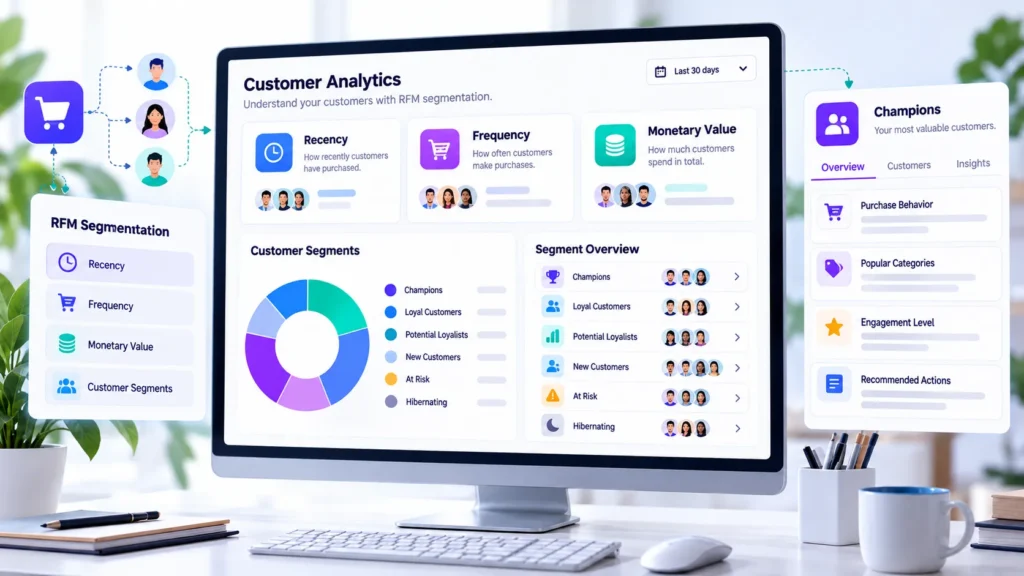
Some customers order every month. Others make one purchase and never return. Some of your historically valuable buyers may have stopped ordering, even though your store still treats them like active customers.
WooCommerce RFM analysis helps you understand these differences by examining three customer behaviors: how recently someone purchased, how frequently they order, and how much they spend. These signals help you organize customers into meaningful groups instead of relying on total spending alone.
In this guide, you will learn how RFM scoring works, how to identify loyal, at risk, and lost customers, how to interpret customer segments, and how to use WooCommerce reporting and Shop Explorer by WPAzleen as part of a practical customer management workflow.
Before getting started, note that RFM is an analytical method, not automatically a feature of every customer management plugin. The exact scoring, segment names, and available actions depend on the tool you use.
Table of Contents
- What Is WooCommerce RFM Analysis?
- The Three RFM Metrics Explained
- How RFM Scoring Works
- 7 Powerful Ways to Use RFM Segmentation
- A Practical RFM Example
- WooCommerce RFM Analysis Tools
- How Shop Explorer Fits Into the Workflow
- Common RFM Mistakes
- Data Quality and Customer Privacy
- Frequently Asked Questions
What Is WooCommerce RFM Analysis?
WooCommerce RFM analysis is a customer segmentation method that evaluates buying behavior using three dimensions: Recency, Frequency, and Monetary value. Each dimension answers a different question about the customer’s relationship with your store.
- Recency: How recently did the customer place an order?
- Frequency: How often has the customer ordered during the selected period?
- Monetary value: How much has the customer spent during the selected period?
Combining these metrics can reveal patterns that a simple list of top spenders might miss. A customer who purchased recently, orders regularly, and spends consistently may deserve a different strategy from someone who spent a large amount once but has not returned for a long time.
RFM is a snapshot of customer behavior within a defined period. It is useful for prioritizing follow up work, but it does not prove why someone stopped buying or guarantee what they will do next.
The Three RFM Metrics Explained
Recency: When did the customer last order?
Recency measures the time since a customer’s most recent qualifying purchase. A more recent order generally receives a better recency score than an older order.
For example, a customer who ordered last week may be more active than one whose last order was eight months ago. However, the correct interpretation depends on the buying cycle. Eight months may be a long gap for groceries but normal for furniture or expensive equipment.
Frequency: How often does the customer buy?
Frequency measures the number of qualifying orders placed during the selected period. Customers with repeated purchases often demonstrate an established relationship with the store.
Frequency should be interpreted in context. A customer who buys once a year may be perfectly loyal if the product is intended to last a year. Compare customers with similar purchase cycles wherever possible.
Monetary value: How much does the customer spend?
Monetary value measures spending over the selected period according to the reporting tool’s definition. A higher value can indicate a customer who contributes a substantial amount of sales revenue.
Spending is not the same as profit. Product costs, refunds, discounts, shipping, and transaction fees may affect the actual contribution from a customer. Check the metric definition before treating a high monetary score as proof of high profitability.
How RFM Scoring Works
Many RFM systems assign a score to each dimension and combine the results into a customer profile. A common approach uses scores from 1 to 5, with higher scores indicating more recent purchases, more frequent orders, or greater spending.
Some systems calculate scores using relative groups, such as quintiles, which divide customers into five groups for each metric. Others use fixed thresholds chosen by the store. These methods can produce different scores for the same customer, so the scoring rules matter.
| Dimension | Higher score generally means | Question to ask |
|---|---|---|
| Recency | The last order was more recent | Is this customer still buying within their normal cycle? |
| Frequency | More qualifying orders | Does this customer purchase repeatedly? |
| Monetary value | Higher recorded spending | How much sales value does this customer contribute? |
A score such as RFM 555 would represent strong scores across all three dimensions in a five point model. A score such as 155 would indicate low recency and frequency scores but a high monetary score. The exact meaning still depends on the chosen scoring rules and period.
Do not assume every WooCommerce plugin uses five point scoring or the same thresholds. Check the documentation of your selected tool before comparing scores between systems.
7 Powerful Ways to Use RFM Segmentation
1. Recognize your most engaged customers
Customers with strong recency, frequency, and monetary scores may represent some of your most engaged buyers. Review their purchasing patterns and understand which products or services they value.
Consider appropriate ways to recognize these relationships, such as useful product updates, better support, early access to relevant launches, or a thank you message. A high score is a reason to understand the relationship, not permission to overwhelm someone with promotions.
2. Find customers who may be at risk
At risk customers may have purchased frequently or spent a substantial amount in the past but have not ordered recently. Their historical behavior makes the change worth investigating.
Review their last order, typical purchase interval, and product category. If appropriate, send a relevant and respectful message or offer useful support. Do not assume that inactivity always means dissatisfaction or that a discount is the right solution.
3. Separate lost customers from temporarily inactive buyers
A customer who has not ordered for a long time may be inactive, but the label lost should be interpreted carefully. Some products have naturally long replacement cycles, and customers may return when they need the product again.
Choose inactivity thresholds that reflect your products and buying patterns. Use the segment to decide whether further analysis or a retention campaign is justified rather than treating the label as a permanent fact about the customer.
4. Identify recent first time buyers
Customers with recent purchases but little or no repeat history may need a different approach from established loyal buyers. They may benefit from clear product guidance, helpful onboarding, delivery updates, or an easy route to customer support.
Focus on making the first purchase experience successful. A well handled order can provide a better foundation for a repeat relationship than sending an unrelated promotional email immediately after checkout.
5. Understand high spenders who rarely order
A customer with high monetary value but low frequency may have made one large purchase. This can be important for some business models, but it is different from a customer who repeatedly orders smaller amounts.
Review product type, order history, refunds, and the typical buying cycle. This helps you decide whether to prioritize account support, product education, or a relevant follow up instead of assuming the customer will return automatically.
6. Compare customer segments by revenue contribution
Counting customers in a segment is useful, but it does not show how much that segment contributes to sales. Where your reporting tool provides segment revenue, compare customer counts with revenue share and average spending.
A small group may contribute a large share of sales, while a large group may contain many low frequency buyers. Use this information to understand concentration risk and decide which customer relationships deserve further analysis.
7. Measure whether retention efforts work
RFM can help you define a starting group for a retention campaign. For example, you might select previously active customers whose recency score has fallen while their frequency and monetary scores remain strong.
Compare subsequent purchase behavior with a suitable baseline or control group when possible. Track the campaign period, costs, discounts, and resulting orders. Do not attribute every later purchase to the campaign without considering what might have happened anyway.
A Practical WooCommerce RFM Example
Consider three fictional customers in a store selling reusable household products. The figures below are illustrative, not actual Shop Explorer analytics or customer records.
| Customer | Last order | Orders in period | Recorded spend | Possible interpretation |
|---|---|---|---|---|
| Customer A | 7 days ago | 8 | $480 | Recently active repeat buyer |
| Customer B | 180 days ago | 7 | $620 | Previously valuable buyer who may be at risk |
| Customer C | 14 days ago | 1 | $700 | Recent high value order with little repeat history |
Customer A has recent and frequent purchasing activity. Customer B has a strong historical order count and spending total but has not purchased recently. Customer C has spent the most in this example, but the single order does not yet establish a repeat purchasing pattern.
An RFM approach helps distinguish these patterns. The next step is to verify the reporting period, compare each customer with the store’s normal buying cycle, and choose an appropriate follow up. Exact segment names and scores will vary by tool and scoring method.
WooCommerce RFM Analysis Tools
WooCommerce store owners can explore customer behavior using built in reporting or a dedicated analytics tool. The best choice depends on whether you need basic customer filters, formal RFM scoring, reusable segments, exports, or broader store management features.
WooCommerce Customer Analytics
The official WooCommerce Customer Analytics documentation describes a Customer Segments tab based on RFM scoring. Its documented method scores recency, frequency, and monetary value, then maps customers into segments such as Champions, Loyal, At Risk, About to Sleep, Hibernating, and Lost.
The documented report includes segment counts, revenue share, average lifetime value, individual customer scores, and customer level details. It also describes segment filtering, CSV downloads, and selecting customers for email actions. Review the official documentation for current availability and requirements.
Read the official WooCommerce Customer Analytics documentation.
Metorik customer segmentation
Metorik provides customer segmentation based on filters such as total spending, order count, and last order date. Its documentation describes reusable segments, more complex filter combinations, and exports. This can be useful when you need flexible customer groups for reporting or marketing workflows.
Check its current documentation to confirm the exact segmentation options and whether its workflow fits your store.
Explore Metorik customer segmentation and its segmentation documentation.
How Shop Explorer Fits Into the RFM Workflow
Shop Explorer by WPAzleen documents a customer management area with customer profiles, lifetime value, purchase history, registration and last order dates, refund totals, notes, search and filtering, customer editing, and CSV export.
Its public feature list also describes automatic and manual customer tags, with examples such as VIP Customer, At Risk Customer, New Customer, Loyal Customer, Big Spender, Discount Hunter, Frequent Buyer, and Dormant. These labels can support customer organization, but a tag is not the same thing as a complete RFM scoring model.
Use customer information to investigate a segment
If your workflow identifies a customer group worth investigating, use the available customer records and purchase history to understand the underlying behavior. Review recent orders, lifetime value, refund history, and relevant notes before deciding what to do next.
Do not assume full RFM scoring is available
The internal Shop Explorer feature reference lists a full RFM matrix and cohort heatmap among Pro capabilities. However, the exact availability should be checked against the live product and installed release before publishing a claim that Shop Explorer provides a particular RFM score, segment dashboard, or automated RFM workflow.
For the currently documented customer management capabilities, visit the Shop Explorer WordPress.org listing and the WPAzleen documentation.
Common WooCommerce RFM Analysis Mistakes
- Using an unsuitable time period: select a period that makes sense for your store’s normal purchase cycle.
- Mixing scoring methods: do not compare scores from different tools without checking their rules.
- Treating revenue as profit: account for costs and refunds before drawing profitability conclusions.
- Assuming inactivity means churn: a long gap may be normal for some products.
- Sending the same offer to every segment: match the action to the customer’s situation and your business objective.
- Ignoring small datasets: scores based on a handful of customers may not create meaningful groups.
- Leaving segments unreviewed: customer behavior changes, so review segment criteria and results regularly.
Data Quality and Customer Privacy
RFM analysis is only as useful as the underlying order and customer data. Check how guest purchases are associated with customer records, how refunds are treated, which order statuses count, and whether the selected date range is appropriate.
Customer segmentation also involves personal data. Restrict access to authorized team members, export only the fields you need, and use customer information according to applicable privacy requirements and your store’s policies.
Use RFM scores to prioritize analysis and service, not to make unsupported assumptions about individuals. A segment describes a pattern in recorded behavior, not a complete picture of the customer.
Frequently Asked Questions
What does RFM stand for in WooCommerce?
RFM stands for Recency, Frequency, and Monetary value. These metrics measure how recently customers purchased, how often they ordered, and how much they spent during a defined period.
How does WooCommerce RFM analysis identify loyal customers?
RFM systems look for customers who score well across recent purchasing activity, order frequency, and spending. Segment names and scoring rules depend on the implementation. Strong scores suggest an engaged buying pattern but do not guarantee future purchases.
How do I find at risk customers?
Look for customers who previously ordered frequently or spent substantial amounts but have not purchased recently. Compare their inactivity with their normal purchase cycle before deciding whether to contact them or take another action.
Does WooCommerce support RFM analysis?
WooCommerce’s official Customer Analytics documentation describes RFM based Customer Segments. Check the current documentation and your installed version to confirm the available interface and requirements.
Does Shop Explorer include a full RFM matrix?
Shop Explorer’s internal feature reference lists a full RFM matrix as a Pro capability, while its public listing documents customer profiles, lifetime value, purchase history, and customer tagging. Verify the exact feature availability in the current release before relying on full RFM scoring or a dedicated matrix view.
Is RFM analysis the same as customer lifetime value?
No. Customer lifetime value measures customer value over time according to a chosen definition. RFM combines recency, frequency, and monetary value to segment customers based on several aspects of purchasing behavior.
Can RFM analysis predict which customers will leave?
RFM can identify customers whose recorded purchasing behavior resembles an at risk pattern. It does not prove that a customer will leave. Use the scores as a signal for further investigation rather than a guaranteed prediction.
Build a More Useful WooCommerce Customer Strategy
WooCommerce RFM analysis gives store owners a structured way to understand customer behavior. By combining recency, frequency, and monetary value, you can distinguish recently active buyers from high spending customers who have gone quiet and customers whose buying patterns have changed.
Use the reporting and segmentation tools that match your needs, verify how their scores are calculated, and connect each segment to a sensible business action. Shop Explorer by WPAzleen can support the broader customer management workflow through customer profiles, purchase history, lifetime value, tags, notes, and exports. Confirm the current release before assuming a dedicated RFM matrix is available.
Shop Explorer is developed by WPAzleen. Features and plan availability may change. Consult the current plugin listing and documentation before relying on a particular RFM workflow.







Leave a Comment
Your email address will not be published. Required fields are marked *