
Table of Contents
It usually starts with a simple sentence: “I didn’t change anything.”
A WordPress website can have several administrators, editors, developers, customers, plugins, themes, automated tasks, and WooCommerce processes working at the same time. Something changes, a setting suddenly looks different, a product price has been modified, a suspicious login appears, or an important file changes. Then comes the difficult question: Who did it?
Without a proper WordPress activity log plugin with activity history, finding that answer can become a guessing game. You may know that something went wrong, but not what happened immediately before it.
That is exactly where a WordPress activity log plugin becomes useful.
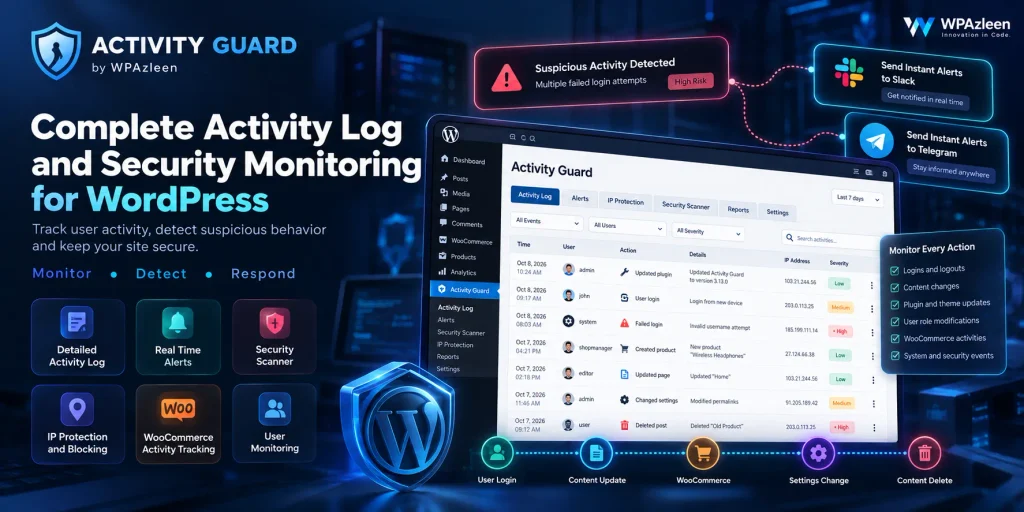
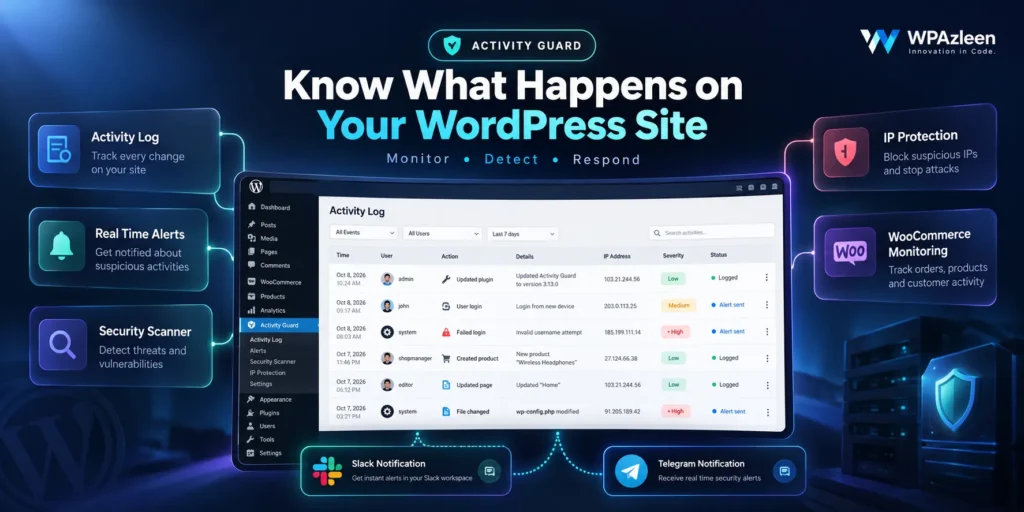
Activity Guard from WPAzleen takes the idea of an activity log much further. Instead of simply recording administrative events, it combines activity monitoring with real time notifications, security controls, threat detection, file integrity monitoring, WooCommerce intelligence, CAPTCHA protection, security scanning, and emergency response tools.
The result is a central monitoring layer that helps you understand what is happening on your WordPress website and respond when something needs attention.
Table of Contents
- Why Your WordPress Site Needs an Activity Log
- What Is Activity Guard?
- Monitor Every Important WordPress Activity
- Get Real Time Alerts Instead of Checking Your Dashboard
- Turn Activity Monitoring Into Active Security
- Block Suspicious IP Addresses
- Stop Bots Before They Become a Bigger Problem
- Know When Important Files Change
- Scan Plugins, Themes and Core Files
- Monitor Your WooCommerce Store
- Understand Incomplete Orders and Cart Activity
- What Happens When You Need an Emergency Lockdown?
- Bring Security Alerts to Telegram
- How to Set Up Activity Guard
- Why Activity Guard Is More Than a Basic Activity Log
- Final Thoughts
Why Your WordPress Site Needs an Activity Log
Imagine you manage a WordPress website with three administrators and several editors.
One morning, you notice that an important page has changed. The content is different, a plugin was updated, and one user account has a login you do not recognize.
Where do you start?
You could manually check WordPress revisions. You could inspect plugin settings. You could look through server logs. You could ask every administrator what they changed. You could check your email for notifications.
That is a lot of detective work for something that should have a simple answer.
An activity log gives you that missing history. It creates a record of important actions so you can understand what happened instead of relying on memory.
But there is an important distinction.
A useful monitoring system should not only tell you what happened after the fact. It should also help you notice important events while they are happening and give you tools to respond.
What Is Activity Guard?
Activity Guard is a WordPress monitoring and security plugin from WPAzleen designed to give website owners a broader view of what is happening across their site.
At its core is activity monitoring. Around that core, Activity Guard adds real time notifications, login monitoring, IP management, CAPTCHA protection, file integrity monitoring, security scanning, WooCommerce monitoring, analytics, and emergency controls.
This combination matters because website activity rarely exists in isolation.
A failed login can become a security event. A successful administrator login can lead to a configuration change. A product price change can affect your store. A modified theme file can indicate a serious security problem.
Activity Guard connects these different types of events into one monitoring experience.
Monitor Every Important WordPress Activity
The first reason to use Activity Guard is visibility.
When multiple people work on a WordPress website, changes happen constantly. Users log in, content gets updated, plugins are activated, themes are changed, settings are modified, and WooCommerce data changes.
Activity Guard provides an audit trail so administrators can review these events and understand what happened.
The dashboard can help you filter activity by factors such as time, role, and severity, making it easier to find the event you actually care about instead of searching through an enormous list of unrelated records.
How to use it
- Open the Activity Guard dashboard in WordPress.
- Review the activity log to understand recent site events.
- Use available filters to narrow the activity by time, role, or severity.
- Open the relevant event when investigating a change.
- Use the information to determine whether the activity was expected or requires action.
This is particularly useful for agencies, ecommerce stores, membership websites, editorial teams, and any WordPress installation where more than one person has administrative access.
Get Real Time Alerts Instead of Checking Your Dashboard
An activity log is useful, but there is one obvious problem: someone has to look at it.
That is why Activity Guard connects activity monitoring with real time notifications.
Instead of waiting until the next time you open WordPress, important events can be delivered through supported notification channels such as Slack, Telegram, email, and the WordPress dashboard.
For example, your development team can receive security events in Slack while your store team receives WooCommerce related notifications.
This changes the workflow from “check the website and see what happened” to “get notified when something important happens.”
How to use Slack notifications
- Open the Activity Guard notification or API configuration settings.
- Connect your Slack webhook.
- Test the connection before relying on it for important alerts.
- Enable the activity or security notifications you want your team to receive.
- Monitor the selected Slack channel for incoming events.
The advantage is not simply receiving more notifications. The real advantage is receiving the right information where your team already works.
Turn Activity Monitoring Into Active Security
This is where Activity Guard starts moving beyond the traditional activity log.
Knowing that someone attempted to log in is useful. Being able to detect suspicious login behavior, manage IP addresses, protect login forms, monitor files, and respond to a potential incident is much more useful.
Activity Guard combines monitoring with defensive security features so administrators can move from visibility to response.
Block Suspicious IP Addresses
Some activity deserves more than a notification.
If a particular IP address repeatedly generates suspicious login attempts or unwanted traffic, administrators may want to block it rather than simply recording the activity.
Activity Guard provides IP management features that support blocking and trusted IP protection. Its security controls also include automatic blocking and geographic filtering capabilities.
When this is useful
- Repeated failed login attempts
- Suspicious automated traffic
- Known unwanted IP addresses
- Protecting trusted administrator access
- Responding to suspicious traffic patterns
A basic activity logger may tell you that an attack happened. Activity Guard is designed to give you controls that help you respond to the activity as well.
Stop Bots Before They Become a Bigger Problem
Not every suspicious visitor is a human.
Automated bots can repeatedly target login forms, registration forms, comments, and other public endpoints.
Activity Guard supports CAPTCHA protection through Cloudflare Turnstile and provides protection options for areas such as login, registration, comments, and WooCommerce checkout.
The idea is straightforward: instead of waiting for automated traffic to generate a long list of suspicious events, add a verification layer where appropriate.
How to use CAPTCHA protection
- Open the CAPTCHA or security protection settings in Activity Guard.
- Connect your Cloudflare Turnstile configuration.
- Select the forms or areas where protection should be enabled.
- Save the configuration.
- Test the protected form to make sure legitimate visitors can still use it normally.
Know When Important Files Change
Here is another scenario.
You open your website one morning and discover that something is behaving differently. Nothing obvious changed in the dashboard, but a theme file has been modified.
Without file monitoring, discovering that change can take time.
Activity Guard’s file integrity monitoring is designed to detect changes to WordPress core, plugin, and theme files and alert administrators when unauthorized modifications occur.
This becomes particularly important during a security investigation because unexpected file modifications can provide an important clue about what happened.
Scan Plugins, Themes and Core Files
Monitoring changes is only one part of security.
WordPress sites often contain plugins and themes from many different developers. A vulnerability in one of those components can create a security risk for the entire website.
Activity Guard includes a security scanner designed to scan plugins, themes, and core files and check for security concerns using multiple security data sources.
The dashboard provides security status information so administrators can identify areas that need attention rather than discovering a vulnerable component only after an incident.
How to use the scanner
- Open the Security Scanner in Activity Guard.
- Run a scan of the site’s installed components.
- Review secure, warning, and critical results.
- Investigate vulnerable plugins or themes.
- Update, replace, or otherwise address components that require attention.
This makes the scanner useful as part of regular WordPress maintenance rather than something you only open after a suspected attack.
Monitor Your WooCommerce Store
If your WordPress website runs WooCommerce, the definition of “important activity” changes completely.
A store owner needs to know when orders arrive, products run low on stock, orders change status, refunds happen, coupons are used, and customers interact with the checkout process.
Activity Guard includes WooCommerce monitoring and intelligence features that bring store activity into the same monitoring environment.
You can use the WooCommerce features to keep an eye on sales activity, inventory related events, incomplete orders, and store analytics.
That is important because your website is not only a technical system. For a WooCommerce business, it is also the sales system.
Why WooCommerce monitoring matters
- Know when new sales activity happens.
- Identify low or out of stock products.
- Monitor important order status changes.
- Understand customer and cart activity.
- Connect store activity with your wider website monitoring.
Understand Incomplete Orders and Cart Activity
There is another type of event that deserves attention: the sale that never happened.
A customer can add products to a cart, begin checkout, and leave before completing the purchase.
Without cart analytics, that customer simply disappears from your sales report.
Activity Guard provides WooCommerce incomplete order and cart interaction analytics so store owners can see where potential purchases are being lost and identify opportunities for follow up.
This is one of the biggest differences between a traditional activity logging mindset and a broader monitoring platform. The goal is not only to record technical events. It is to help you understand what is happening across the business.
What Happens When You Need an Emergency Lockdown?
Now imagine the worst case.
You detect suspicious activity and believe an account may have been compromised. You are not sitting in front of your computer. You need to stop access immediately.
This is where Activity Guard’s Emergency Shutdown feature becomes important.
Activity Guard provides an emergency control that can be activated remotely through its API or cURL based workflow. During lockdown, non super administrator sessions can be invalidated and new logins can be blocked until the emergency state is deactivated.
How to prepare emergency shutdown
- Open the Emergency Control settings.
- Enable emergency shutdown mode.
- Select the administrators who should retain access during an emergency.
- Enable remote activation if you want remote control.
- Securely store the generated authentication token and endpoint.
- Test your emergency procedure before you actually need it.
This is an important difference between monitoring and incident response. A log can tell you that something is wrong. An emergency control can help you act when time matters.
Bring Security Alerts to Telegram
Slack is useful for teams, but not every administrator spends the entire day inside Slack.
Activity Guard also supports Telegram notifications for supported events, including security alerts, WooCommerce activity, user activity, and emergency shutdown notifications.
This gives site owners another way to receive important information without constantly opening the WordPress dashboard.
How to Set Up Activity Guard
One of the most important parts of any monitoring plugin is the setup experience. A powerful security dashboard is not very useful if a site owner cannot configure it correctly.
Activity Guard provides a guided configuration experience that helps you connect notification channels and choose the monitoring features that matter to your site.
A practical starting configuration
- Install and activate Activity Guard.
- Connect your preferred notification channel.
- Enable activity logging.
- Configure login and security monitoring.
- Configure IP protection and CAPTCHA where appropriate.
- Enable file integrity monitoring.
- Run the security scanner.
- If you use WooCommerce, configure store monitoring and analytics.
- Review the activity dashboard regularly.
- Prepare the emergency shutdown configuration before an emergency happens.
You do not need to enable every feature on day one. Start with the events that matter most to your website, then expand your monitoring as your needs grow.
Why Activity Guard Is More Than a Basic Activity Log
There are many WordPress plugins that can record administrative activity. That is useful, but Activity Guard approaches the problem from a wider perspective.
A basic activity log answers one primary question: what happened?
Activity Guard tries to answer several more:
- What happened? Through activity monitoring and audit history.
- Who needs to know? Through Slack, Telegram, email, and dashboard notifications.
- Is it suspicious? Through security monitoring and scanning.
- Can I stop it? Through IP management and security controls.
- Did a file change? Through file integrity monitoring.
- Is my store affected? Through WooCommerce monitoring and analytics.
- What if the situation becomes serious? Through emergency shutdown controls.
That broader approach is what makes Activity Guard interesting for modern WordPress sites.
Instead of treating activity logging, security, notifications, and WooCommerce monitoring as completely separate problems, Activity Guard brings them into one monitoring experience.
Final Thoughts
Your WordPress website is never really standing still.
Someone is logging in. A plugin is updating. An editor is changing content. A customer is placing an order. A bot is testing a login form. A product is going out of stock. A file is changing. A security scanner is finding something that deserves attention.
The problem is not that WordPress has too much activity.
The problem is not knowing which activity matters.
Activity Guard is built around that problem.
It gives WordPress administrators an activity history, real time notifications, security controls, IP management, CAPTCHA protection, file integrity monitoring, vulnerability scanning, WooCommerce intelligence, and emergency response tools in one place.
If your website is important to your business, knowing what happens on it should not be optional.
Start monitoring your WordPress website with Activity Guard.








Leave a Comment
Your email address will not be published. Required fields are marked *