
Table of Contents
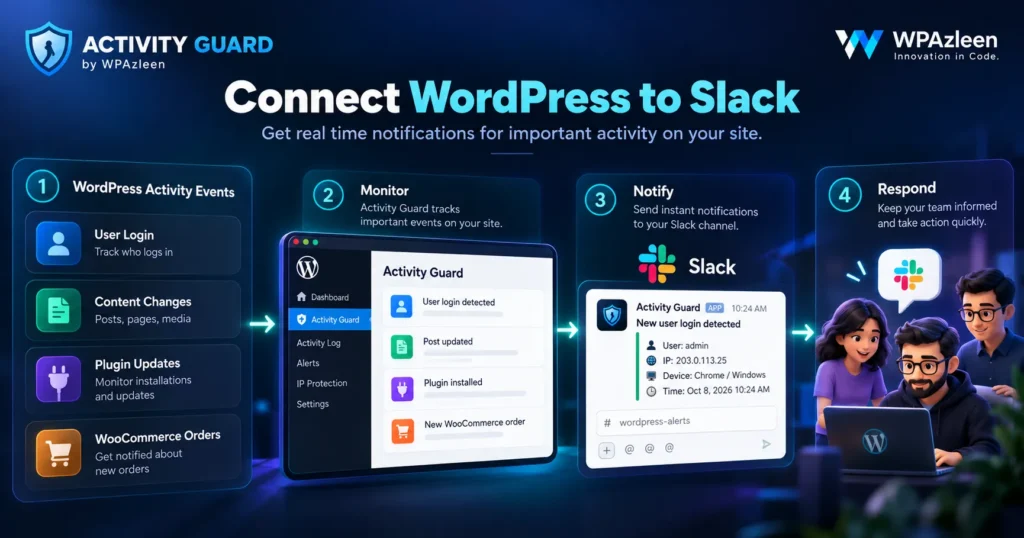
Imagine you manage a WordPress website with a small team. A developer updates a plugin, a store manager changes a product, and someone makes an unexpected change to an important setting.
There is just one problem. Nobody else knows what happened until someone opens the WordPress dashboard.
Now imagine receiving the important updates directly in Slack, the same place where your team already discusses tasks, reports bugs and coordinates work.
That is the practical value of WordPress Slack notifications. Instead of repeatedly checking your website, you can bring important events to the place where your team is already working.
Activity Guard by WPAzleen makes this workflow possible with Slack webhook integration included in its free version. It also connects notifications with activity monitoring, security features and WooCommerce events.
Why Connect WordPress to Slack?
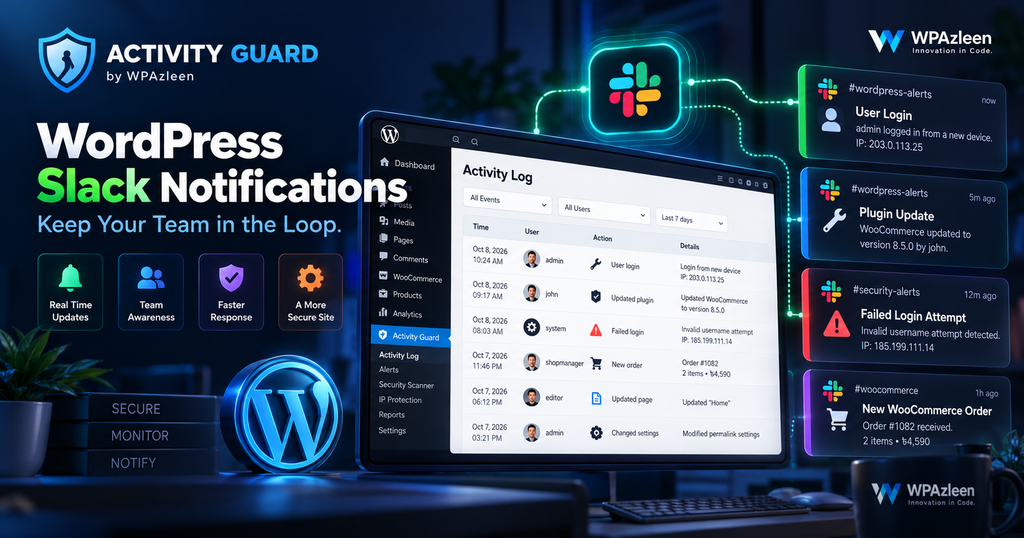
WordPress is where you manage your website. Slack is often where your team communicates. Connecting the two can reduce the gap between an important event and the person who needs to know about it.
Without notifications, someone may need to check the dashboard manually to discover a failed login, a plugin change or an important store event. Email notifications can help, but busy inboxes make it easy to overlook a message.
Slack provides another option. You can direct notifications to an appropriate channel so your team can see relevant updates without logging in to WordPress every time.
For example, a development team might use a dedicated channel for website activity, while a store team might prefer to receive relevant WooCommerce updates in its own channel.
What WordPress Events Can Trigger Alerts?
Useful WordPress Slack notifications are about more than publishing a new post. They can help a team stay aware of important changes across a website.
User and Administrator Activity
Keep track of important user activity, including login events, failed login attempts and changes made by website administrators. This visibility can help you investigate unexpected access or changes.
Plugin and Theme Changes
A plugin update or theme change can affect a live website. Activity notifications help your team identify when important changes happen and investigate problems with better context.
Content Updates
Content teams can use activity alerts to stay informed about relevant post, page and other content changes. This is particularly helpful when several editors work on the same website.
Security Events
Security related notifications can help bring suspicious activity to your attention. Activity Guard combines notification delivery with features such as IP blocking, login protection, CAPTCHA and security scanning.
WooCommerce Activity
Online stores can use notifications to stay informed about relevant orders, product changes and other store events. Activity Guard also offers WooCommerce analytics and cart monitoring, making it useful beyond basic website change alerts.
How Activity Guard Handles Slack Notifications
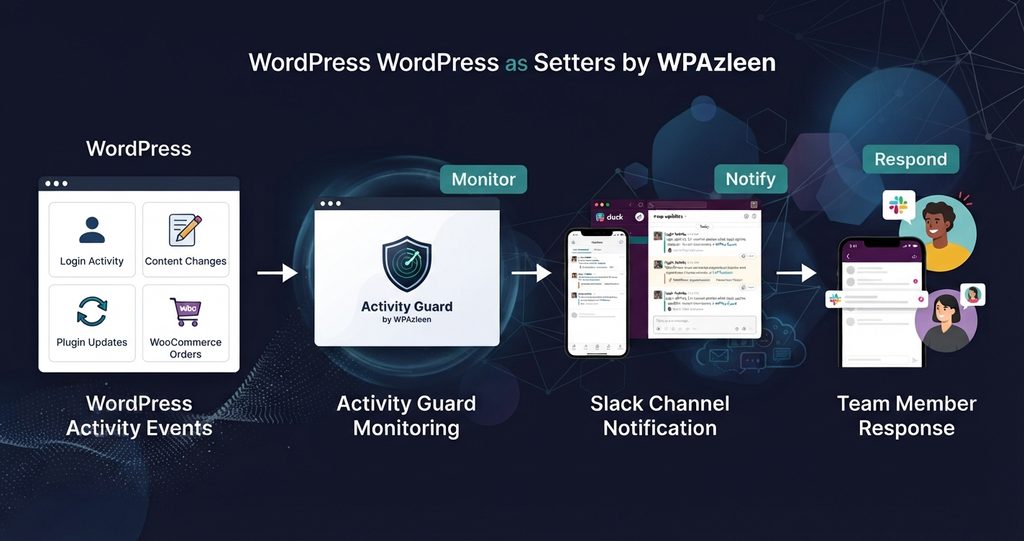
Activity Guard is designed to connect WordPress activity with a broader monitoring workflow. Slack is one of its notification channels, alongside Telegram and email.
The basic workflow is straightforward: configure your Slack connection, choose the events you want to monitor, and let the plugin send relevant notifications to your workspace.
- Slack integration: Send supported WordPress activity notifications to Slack through an incoming webhook.
- Activity history: Review logged events in WordPress when you need more context.
- Security monitoring: Combine notifications with available security controls and monitoring features.
- Additional channels: Use Telegram or email when those channels better fit your workflow.
- WooCommerce monitoring: Keep relevant store activity connected to your wider monitoring process.
The important advantage is that Slack notifications are not an isolated feature. They are part of a plugin that also provides activity logging and security tools.
How to Set Up WordPress Slack Notifications
You do not need to build a custom integration to get started. Activity Guard supports Slack incoming webhooks, which allow a configured integration to send messages to a Slack channel.
Step 1: Install Activity Guard
Install Activity Guard from the WordPress plugin directory and activate it on your website.
Step 2: Create a Slack Incoming Webhook
In your Slack workspace, configure an app with incoming webhooks enabled and create a webhook for the channel that should receive your notifications. Follow Slack’s current setup instructions and workspace permissions.
Step 3: Connect Slack to Activity Guard
Open Activity Guard in your WordPress dashboard and navigate to its Integrations settings. Enter your Slack webhook URL in the appropriate field and save your configuration.
Step 4: Choose the Events You Need
Configure the supported notification options for the events relevant to your website. Start with important activity and security events rather than sending every possible update into one busy channel.
Step 5: Verify the Connection
Use the available test or verification option if provided by your configuration screen. Confirm that messages arrive in the intended Slack channel, then review the notification settings to ensure they match your team’s needs.
Security tip: Treat your incoming webhook URL like a secret. Do not publish it in documentation, screenshots or public repositories. If it becomes exposed, rotate or replace it in Slack and update your WordPress configuration.
Practical Examples for Teams and Agencies
For WordPress Developers
Suppose a client reports that the website started behaving differently after a plugin change. Activity notifications can help the team notice the change and investigate the corresponding activity history instead of relying only on memory or chat messages.
For Digital Agencies
Agencies often manage websites for multiple clients. A structured notification workflow helps teams notice relevant events and decide which ones require investigation. Separate channels or carefully configured workspaces can help keep client activity organized.
For Website Owners
Business owners may not log in to WordPress throughout the day. Slack notifications can give them a convenient way to stay aware of important activity without constantly checking the dashboard.
WooCommerce Slack Notifications
For an online store, website activity can affect revenue, fulfilment and customer experience. That makes timely visibility especially useful.
Depending on the configured notification options, WooCommerce monitoring can help teams follow relevant order and product activity. Activity Guard also includes sales related monitoring, coupon tracking and cart analytics among its broader capabilities.
Consider a store where several people manage products, promotions and orders. Bringing supported events into a shared notification workflow can make it easier for the right person to notice a change and investigate it.
For teams specifically looking for WooCommerce notifications, the key is to choose the events that support daily operations instead of overwhelming the channel with low priority messages.
Activity Guard vs Other Slack Notification Plugins
Not every Slack integration for WordPress solves the same problem. Some focus on activity logging, others on errors, and others on sending selected events to a channel.
WP Activity Log is a well established activity logging plugin. Its listed premium features include configurable Slack notifications and real time log forwarding. It is a strong option for teams that need detailed audit logging and reporting.
Error Notifier for Slack focuses on sending notifications about critical WordPress errors. It is more specialized for error awareness and troubleshooting than for a combined activity and security workflow.
Activity Guard combines Slack notifications with a broader collection of activity logging, security and WooCommerce monitoring features. Its free version includes the Slack webhook integration, so you can begin using that capability without purchasing a premium plan.
| Capability | Activity Guard | WP Activity Log | Error Notifier for Slack |
|---|---|---|---|
| Slack notifications | Included in free version | Premium feature | Included for supported errors |
| General activity logging | Yes | Core capability | Focused on errors |
| Security monitoring tools | Yes | Primarily activity logging | Primarily error notifications |
| IP blocking | Yes | Not its primary purpose | Not its primary purpose |
| WooCommerce monitoring | Yes | Supported activity logging features | Not its primary purpose |
| Telegram notifications | Yes | Depends on integrations and plan | Not a core feature |
This comparison reflects the products’ stated focus and feature descriptions. Features and plan details can change, so review each plugin’s current listing before making a final purchasing decision.
Do You Need to Pay for Slack Notifications?
Not necessarily. The right choice depends on the features you need and which plan includes them.
With Activity Guard, Slack webhook integration is included in the free version. You can also access its free activity logging and a wider set of security and WooCommerce monitoring capabilities.
By comparison, WP Activity Log lists Slack notifications among its premium features. A specialized error notification plugin may provide a narrower feature set that suits a developer who only needs error alerts.
That makes Activity Guard worth considering if you want to start with Slack notifications and may also need security monitoring, IP protection or WooCommerce visibility.
Instead of comparing prices in isolation, compare the complete set of features you would otherwise need to purchase separately. You can review the current Activity Guard plans on the WPAzleen pricing page.
Best Practices for Useful Slack Alerts
- Prioritize important events. Begin with security events and changes that could affect your website or store.
- Organize channels. Use a channel structure that makes sense for your team and its responsibilities.
- Avoid notification overload. Too many low priority messages can cause people to ignore the important ones.
- Review the activity history. A Slack message provides awareness, while the activity log can help with investigation.
- Protect webhook credentials. Limit access to the webhook URL and rotate it if it is exposed.
- Test your workflow. Verify that notifications reach the intended channel and that the right people can see them.
Final Thoughts
The purpose of WordPress Slack notifications is simple: make important website activity easier to notice and act on.
Whether you manage client websites, develop WordPress products or run a WooCommerce store, a useful notification workflow can reduce the need for constant manual checking.
Activity Guard by WPAzleen brings Slack notifications together with activity logging, security monitoring, Telegram alerts and WooCommerce features. Its free Slack integration makes it a practical starting point for teams that want better visibility without adding another paid notification tool.
Ready to connect WordPress with Slack?








Leave a Comment
Your email address will not be published. Required fields are marked *