
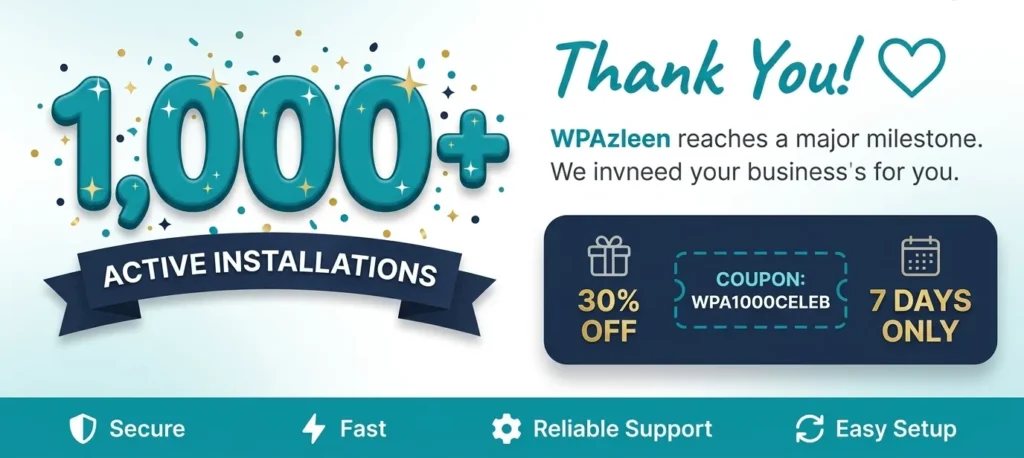
What happens when a simple idea – “why can’t migrating WordPress posts with media just work?” – meets thousands of real-world use cases? You get 1,000+ active installations. Today, we’re celebrating a major milestone for Post Export Import with Media, our WordPress post export import plugin that started as a straightforward migration tool and has grown into a complete content transfer solution trusted by developers, agencies, bloggers, and WooCommerce store owners around the world.
This isn’t just a number. Every installation represents a real WordPress site owner who needed a reliable way to move posts, pages, media, settings, and more – without broken images, missing files, or hours of manual cleanup. We’re deeply grateful, and we want to share this moment with you.

What Is Post Export Import with Media?
Post Export Import with Media is a WordPress post export import plugin built to solve one of the most frustrating problems in WordPress site management: moving content between sites without losing media files. The default WordPress exporter gives you an XML file, but it doesn’t package your images, featured photos, or attachment files. You end up at the new site with broken links and a media library full of missing files.
Our plugin changes that completely. It exports your posts, pages, media, widgets, navigation menus, theme files, plugin files, and even WordPress settings – all in one clean, manageable workflow. On the receiving site, it downloads and reconnects every media file automatically, so your content looks exactly the way it should, on day one.
Since launching on WordPress.org, the plugin has been downloaded and activated on over 1,000 live WordPress sites. Reaching this milestone took consistent effort, community feedback, and a genuine commitment to solving real migration problems – not just building features for the sake of it.
Key Features of Our WordPress Post Export Import Plugin
Here’s a closer look at what makes this WordPress post export import plugin the go-to choice for migration and backup tasks.
Export and Import Posts with All Media Files
The core capability – and the one that set this plugin apart from day one – is automatic media handling. When you export a post or page, all attached media files are packaged alongside the content: featured images, inline content images, gallery items, file attachments. On import, the plugin downloads and reconnects each media file intelligently. If a file already exists in the media library, it reuses it. If it’s missing, it downloads it. No manual uploads. No broken images.
Selective Export and Import
Not every migration needs to move everything. The selective export feature lets you pick exactly which posts or pages to export – ideal for moving a batch of blog posts to a new site, or importing just a handful of pages into an existing installation. You can preview content before importing and even set the post status (Public, Private, or Draft) so imported content doesn’t go live until you’re ready.
Scheduled Exports and Automated Backups
Manual backups are only as good as the last time you remembered to run one. Post Export Import with Media includes scheduled export functionality, so you can set automated backups on a regular schedule. Set it once, and never worry about losing recent content again. This feature alone has saved agencies and developers countless hours of manual backup work.
WordPress Settings, Widgets, and Menus Backup
True site migration goes beyond posts. Our plugin covers the parts most migration tools forget: WordPress core settings (General, Writing, Reading, Discussion, Media, Permalinks, Privacy), widget configurations with sidebar positions, and full navigation menu structures including hierarchy and menu location assignments. When you move a site, everything moves – not just the blog posts.
Theme and Plugin Backup and Transfer
Need to clone a staging environment to production? The plugin handles theme and plugin exports as ZIP files with proper directory structure, including options to keep both versions or replace existing files on import. After import, themes and plugins can be automatically activated – making a full environment transfer a smooth, predictable process instead of a guessing game.
Batch Processing for Large Sites
Large WordPress sites have always been a challenge for export/import tools – server timeouts, memory limits, and PHP execution time restrictions can cut migrations short. Post Export Import with Media includes a dedicated Batch Processing engine that breaks large operations into smaller chunks, ensuring even sites with thousands of posts and hundreds of media files can be transferred reliably and completely.
Real-Time Progress Tracking and Detailed Logs
Every export and import operation shows a live progress bar with percentage completion, timestamped logs, per-item success/warning/error indicators, and a final summary report. You always know exactly what happened – what was imported, what was skipped, and why. This transparency has been one of the most praised features in user reviews.
Rank Math + Yoast SEO Migration Support – Supports Multiple SEO Plugins
For SEO-conscious site owners – which is most of them – losing Yoast SEO data during a migration is a serious problem. Post Export Import with Media supports Yoast SEO field migration, preserving your carefully crafted meta titles, meta descriptions, focus keywords, and canonical settings across the transfer. Your SEO work survives the move intact.
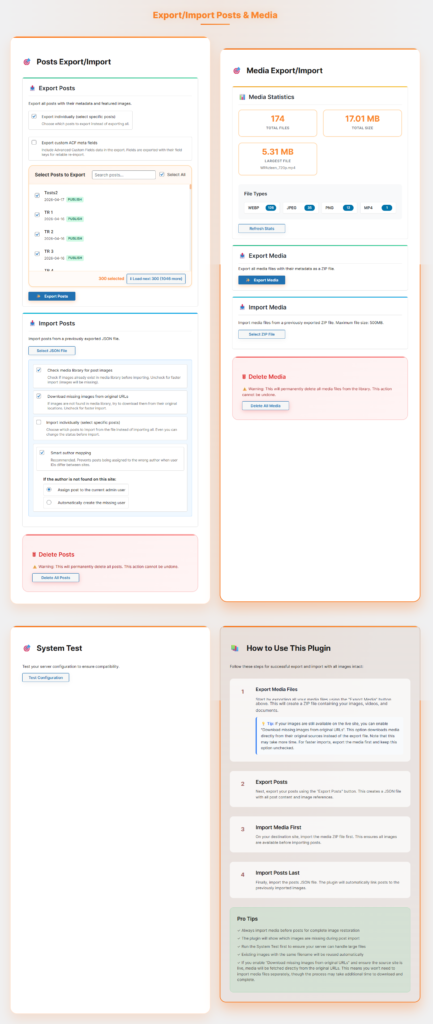
How the WordPress Post Export Import Plugin Works
Using Post Export Import with Media is straightforward, even if you’ve never migrated a WordPress site before.
- Install the plugin on both your source (exporting) and destination (importing) WordPress sites. You can find it free on WordPress.org.
- Go to the Export screen on your source site. Choose what to export: all posts, selected posts, pages, media, widgets, menus, settings, themes, or plugins.
- Download the export file. The plugin packages everything – content and media – into a clean export file.
- Go to the Import screen on your destination site. Upload the export file and preview what will be imported.
- Configure import settings. Choose post statuses, set batch size for large sites, decide how to handle duplicate content.
- Run the import and watch the real-time progress log. The plugin handles media download, URL replacement, and SEO field transfer automatically.
- Review the import summary – items imported, skipped, any warnings – and you’re done.
The entire process is designed to be repeatable, predictable, and safe – with no risk of overwriting existing content unless you explicitly choose to update existing posts.
Who Uses This WordPress Post Export Import Plugin?
Over the past months, the user base for this WordPress post export import plugin has grown into a surprisingly diverse community. Here’s who’s using it and why:
WordPress Developers and Agencies
Agencies building client sites on staging environments need a reliable way to push content from staging to production – and back again for testing. Post Export Import with Media makes this a predictable, one-click process rather than a manual juggling act. Developers working across multiple client sites use the scheduled export feature to automate content backups before making major changes.
Bloggers Switching Hosts or Domains
Moving a blog from one host to another – or rebranding to a new domain – is one of the most anxiety-inducing tasks for content creators. With hundreds or thousands of posts and images to move, the risk of losing content or ending up with broken images is very real. Our plugin makes the transfer clean and complete, including media URL replacement so images point to the new domain automatically.
WooCommerce Store Owners
WooCommerce stores need to move product content, supporting blog posts, and page content between environments regularly. The plugin handles the content and media side of this reliably, and pairs naturally with our Shop Explorer plugin for WooCommerce management.
Site Administrators Managing Multiple WordPress Installs
Organizations managing multiple WordPress sites – intranets, regional sites, multi-brand portfolios – use the plugin to sync content across installations. The selective export feature is particularly valuable here: move only the specific posts or pages that need to be replicated, without touching the rest of the destination site.
Features Built Directly from User Feedback
Reaching 1,000 active installations didn’t happen by accident. Many of the most important features in the current version of this WordPress post export import plugin were built in direct response to feedback from real users tackling real migration problems.
“What started as a simple migration tool has grown into a solution trusted by thousands of WordPress website owners, agencies, developers, and WooCommerce stores.”
Here’s a summary of community-driven features that made it into the plugin:
- Media file migration across websites – the most-requested improvement from early adopters
- Featured image synchronization – because broken featured images were the #1 complaint after basic imports
- Rank Math + Yoast SEO migration support – added after SEO professionals reported losing metadata on transfer
- Media path detection and replacement – automatically updates image URLs to point to the new domain
- Localhost-to-live media URL replacement – solving the specific pain point of pushing a local dev site to production
- Selective post export – added for developers who need to move specific content, not entire sites
- Date range export – useful for content audits and targeted migrations of recent content
- Large migration performance improvements – batch processing built after server timeout reports from users with large sites
Every one of these was a direct response to a user reporting a problem or requesting an improvement. That’s the development philosophy that got us to 1,000 installations – and it’s the same philosophy that will take us further.
Frequently Asked Questions
Does the WordPress post export import plugin include featured images?
Yes, absolutely. Featured images, gallery images, and any media attached to or embedded in your posts are all exported and re-imported automatically. The plugin detects and downloads missing media files on the destination site.
Can it handle large WordPress sites with thousands of posts?
Yes. The batch processing engine breaks large exports and imports into smaller chunks to avoid server timeouts and memory issues. You can configure the batch size in the settings based on your server’s capabilities.
Will importing overwrite my existing content?
No. By default, the WordPress post export import plugin only imports new content and leaves existing posts untouched. You can optionally choose to update existing posts if you want to sync changes from the source site.
Is it beginner-friendly?
Very much so. The interface is designed to be intuitive and self-explanatory, with clear labels, confirmation dialogs, and detailed progress logs. No coding knowledge is required to complete a full site migration.
Does the plugin migrate Yoast SEO data?
Yes. Yoast SEO fields – including meta titles, meta descriptions, focus keywords, and canonical URLs – are migrated along with the post content, so your SEO setup transfers intact.
🎁 Celebration Offer: 30% OFF All Premium Plugins
To celebrate reaching 1,000+ active installations, we’re offering an exclusive discount to our users and community. For the next 7 days only, use coupon code celeb30rate to get 30% OFF any premium plugin from WPAzleen.
- 🛒 Shop Explorer Premium – AI-powered WooCommerce management, bulk updates, revenue analytics
- 🖼 Product Display Premium – Beautiful product sliders, grids, carousels, and tabs
- 🤖 AskAny AI Chatbot Premium – AI-powered customer support and visitor engagement
- 🔒 Activity Guard Premium – Security logging, user monitoring, emergency lockdown mode
- 💬 Simple Form Premium – WhatsApp, Telegram, and multi-channel form builder
Use coupon celeb30rate at checkout. Offer valid for 7 days only from the date of this announcement.
Conclusion
1,000+ active installations is a milestone that belongs to every user who installed the plugin, reported a bug, left a review, or shared it with a fellow WordPress developer. Thank you – genuinely – for making this WordPress post export import plugin part of your workflow. We built it to solve a real problem, and you showed us it was worth building.
We have exciting updates planned across all our products in the coming months. This milestone is not a finish line – it’s a starting point for what comes next. If you haven’t tried Post Export Import with Media yet, install the free version on WordPress.org and see why 1,000+ sites trust it for their migrations. And if you’re already using it – thank you for being part of the journey. 🚀









Leave a Comment
Your email address will not be published. Required fields are marked *